Four weeks ago I published a guide to AEO keyword research: turn keywords into buyer prompts, track mentions and citations across engines, read cited sources as content briefs.
That guide is offense. It answers one question: how do we get included in the answer?
It has a blind spot, and I found it in my own data.
Being included is not the same as being described correctly. And a competitor's comparison page, a stale directory listing, or a domain you do not even own can all become the AI's "source of truth" about your company before a buyer ever reaches your website.
This is the follow-up. It covers the defensive half of prompt tracking, which I have started calling claims intelligence, and it uses real misrepresentations pulled from my own KnitKnot workspace so you can see what the failure mode looks like in practice.
Claims intelligence extracts the specific claims AI makes about your company, assigns each a verdict, traces it to the cited source, links it to the buyer comparisons you lost, and runs a correction workflow until the claim stops appearing.
What AI is telling buyers about SuperMarketers right now
I run a KnitKnot workspace on my own brand. It tracks 100 buyer prompts across ChatGPT, Perplexity, and Gemini, then extracts every factual claim about SuperMarketers from the answers.
Here are three of the sixteen open misrepresentations it has flagged. These are verbatim, with engine and cited source.
| What the AI said (verbatim) | Engine | Source the AI cited | Verdict |
|---|---|---|---|
| “SuperMarketers: Refers to businesses and services centered around physical supermarket operations, grocery distribution, salad bar programs, or related retail setups (such as Isabelle’s Kitchen and Salad Bar Tenders).” | Gemini | supermarketers.com (a domain we do not own) | Inaccurate · critical |
| “SuperMarketer is described as an autonomous, multi-channel marketing platform that uses AI agents to personalize customer interactions and automate things like email campaigns and social-media activity.” | ChatGPT | A SourceForge comparison page for a different product called SuperMarketer | Inaccurate · critical |
| “Full-scale inbound marketing partner (HubSpot Gold Partner) spanning SEO, content, demand gen, and sales nurturing.” | Gemini | No citation given | Inaccurate · critical |
None of these would show up in a visibility dashboard as a problem. In each case SuperMarketers was mentioned. Mention rate: fine. Sentiment: positive. Every one of them is wrong.
The first one is the most instructive. Gemini pulled the description from a domain with the same name that we do not control. Publishing more content on supermarketers.ai does nothing about that. The fix is an entity clarity fix on our own authoritative pages plus corroborating third-party profiles, then a re-run to confirm Gemini stopped using the wrong source.
The second one is an entity collision with a product called SuperMarketer on SourceForge. Same fix category, different source.
The third has no citation at all, which means it is baked into the model's parametric memory. That is the hardest kind to fix, and knowing that changes what you do next.
Why the defensive half matters more as the category gets crowded
Discoverability tooling is crowded. Profound, Peec, AthenaHQ, Scrunch, Otterly, and a dozen others will tell you your mention rate across engines. That is table stakes now.
The higher-stakes question has moved. Buyers are not just asking "what are the best tools for X." They are asking "is GoodCo SOC 2 compliant," "does GoodCo integrate with Zendesk," and "GoodCo vs EvilCo for a 500-person healthcare company." The AI answers with a claim, and it often got that claim from a page EvilCo wrote.
Profound's own research, published with the launch of its FactCheck feature in July 2026, found that 47% of AI response content is unsolicited: the model volunteers details the buyer did not ask for, and that is where inaccuracy concentrates. One brand in that study found AI misrepresenting them 11% of the time in the first week of measurement.
Bluefish cites a March 2026 Rithum survey in which 58% of shoppers said their trust in a brand decreases when AI provides incorrect information about it.
So the question your prompt list has to answer is no longer just "are we in the answer." It is "what did the answer say about us, is it true, where did it come from, and did it cost us the recommendation."
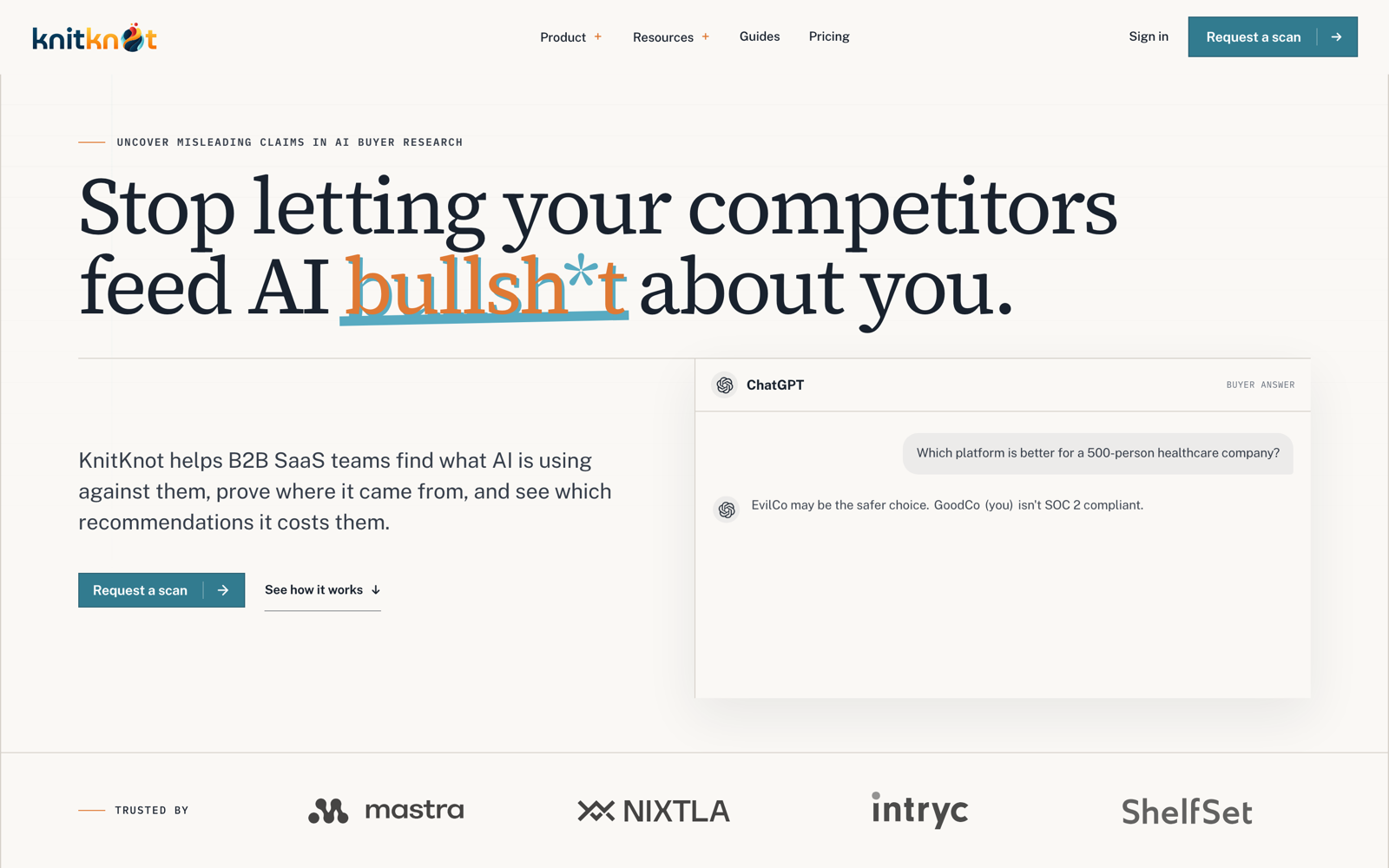
Step 1: Add a defensive prompt family to your tracking list
The original guide allocated 15% of the starter set to branded and reputation prompts. For claims intelligence that share goes up, and the prompts get more adversarial.
Add three families. Aim for 20 to 30 prompts total to start.
| Family | Template | Example | Starter count |
|---|---|---|---|
| Branded description | What does [brand] do? / Describe [brand] for a [persona]. | What does SuperMarketers do, and who is it for? | 5–8 |
| Head-to-head | [Brand] vs [competitor] for a [persona] who needs [outcome]. | SuperMarketers vs Profound for a Series A SaaS team that needs ROI accountability on AI visibility. | 8–12 |
| Fact probe | Is [brand] [claim]? / Does [brand] have [capability]? | Is SuperMarketers a HubSpot partner? Does SuperMarketers offer managed execution? | 6–10 |
The fact probes should cover the claims that decide deals in your category: security and compliance, pricing model, integrations, deployment options, support tiers, data residency, and who you are not for.
Write the head-to-head prompts the way a buyer with a shortlist would. Name the competitor. Add the persona and constraint. Vague comparison prompts produce vague answers with no extractable claims.
If you use KnitKnot's buyer questions, it generates this set from your products, competitors, and decision criteria and holds the question set stable between runs. Stability matters: you cannot measure whether a claim disappeared if the prompts changed.
Step 2: Extract atomic claims from every answer
This is the step most teams skip because it is tedious. Do it anyway, at least for the head-to-head and fact-probe prompts.
For each answer, pull out every checkable statement about your brand as one row. A claim is atomic when it can be true or false on its own.
"SuperMarketers is a full-scale inbound marketing partner and HubSpot Gold Partner spanning SEO, content, demand gen, and sales nurturing" is four claims: inbound partner, HubSpot Gold Partner, spans four services, does demand gen. Split them. Each can be wrong independently and each may have a different source.
Prompt · Engine · Run date · Atomic claim · Verbatim quote · Cited URL · Publisher · Publisher type (competitor / directory / review site / press / unknown / none) · Attribution confidence (footnote / inline link / sole source / none)
Record attribution honestly. If the answer has a numbered footnote next to the claim, attribution is strong. If the answer lists five sources at the bottom and the claim could have come from any of them, attribution is weak. If there is no citation, mark it "none" and treat it as parametric: the model believes this without a page telling it to.
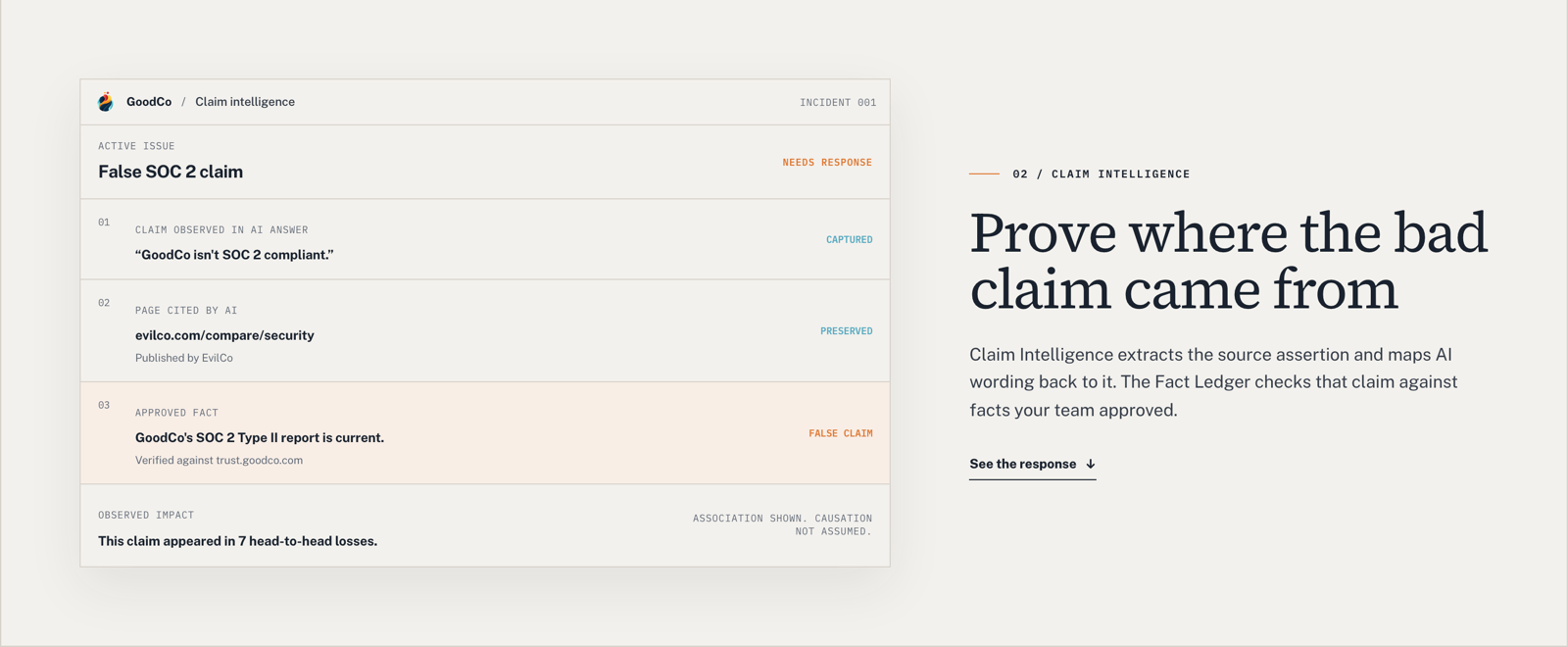
Step 3: Assign a verdict, and resist calling everything false
Every negative statement is not a lie. If you treat it that way you will burn credibility with publishers and with your own legal team.
I use KnitKnot's six verdict categories because they force the distinction:
| Verdict | Meaning | Example | Counts against accuracy? |
|---|---|---|---|
| Supported | Matches an approved fact with a receipt. | “SuperMarketers focuses exclusively on B2B SaaS.” | No |
| Inaccurate | Contradicts an approved fact. | “SuperMarketers is a HubSpot Gold Partner.” | Yes |
| Outdated | Was true, is not now. | An old pricing tier or a retired feature. | Yes |
| Misleading | Technically true, framed to imply something false. | “Does not publish a SOC 2 report” when you are SOC 2 Type II and share the report under NDA. | Yes |
| Unverifiable | No approved fact exists to check it against. | “Customers report faster onboarding.” | No (excluded from the denominator, stays visible) |
| Opinion | A judgment, not a fact. | “Better suited to larger teams.” | No |
Two rules that keep this honest.
First, unknown stays unknown. If you have no approved fact for the claim, you cannot call it false. Log it as unverifiable and go create the fact.
Second, only fact-checkable claims go in the accuracy denominator. An accuracy score that includes opinions is a vanity metric.
Step 4: Build the fact ledger before you build the correction
You cannot assign verdicts without a source of truth, and "the website" is not a source of truth. Websites drift, product marketing overstates, and the compliance page was last touched by someone who left.
A fact ledger is a short list of the facts your company is prepared to defend, each with a receipt, an owner, and a freshness date.
Fact · Category (security / pricing / integration / deployment / support / positioning) · Receipt URL · Owner · Approved on · Review by · Pages that depend on it · Status (current / superseded / refuted)
Start with 30 to 50 facts. Prioritize the ones that appear in your fact-probe prompts and in the claims you extracted in Step 2. For SuperMarketers the first entries were: exclusively B2B SaaS, AEO-only scope, one operator plus AI agents, not a HubSpot partner, not a content production shop, and the exact list of engines we measure.
Keep superseded facts in the ledger with their end date. When a claim is "outdated" rather than "inaccurate," the ledger is how you prove it.
KnitKnot's Fact Ledger does exactly this, and it exposes the same approved record through Markdown and MCP so agents and AI crawlers read the same facts your team approved. That last part is the point: you are not just correcting the answer, you are publishing the record the next model will read.
Step 5: Link claims to head-to-head losses
A false claim that appears once in a branded description prompt is a housekeeping issue. A false claim that appears in the rationale for seven lost comparisons is a revenue issue. You need to know which one you have.
For every head-to-head prompt, record the outcome (win, loss, tie, no recommendation), then tag which extracted claims appeared in the AI's stated reasoning. Count losses per claim.
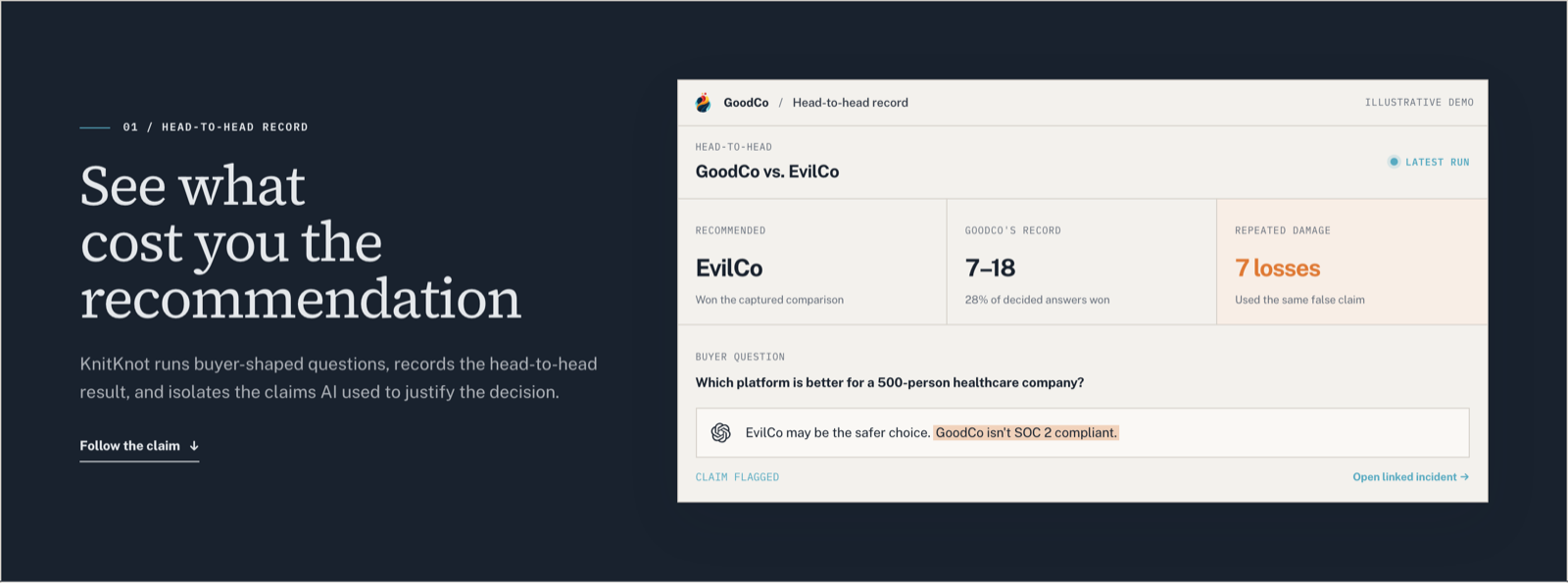
Be careful with the language you use internally. KnitKnot's own framing is the right one: this is association, not causation. The claim appeared in the loss. You do not know the loss would have flipped without it. Say "appeared in 7 losses," not "cost us 7 deals," or your sales leader will stop trusting the report the first time a corrected claim does not move the win rate.
For my own workspace, the sobering number is the head-to-head record itself: across 100 prompts and three engines, most head-to-head comparisons against the tracked competitor set end in a tie or no recommendation, and SuperMarketers wins very few of the decided ones. That is a visibility problem first. But the misrepresentations above mean that even when the model does describe us, it has a meaningful chance of describing someone else.
Step 6: Run the response ladder
Not every claim deserves the same response. Match the response to the source type and the loss count.
| Source type | First move | Second move | Escalation |
|---|---|---|---|
| Your own page (stale or vague) | Fix the page. Add the approved fact in plain language near the top. Update dateModified. | Add the fact to About, product page, and schema. | None needed. Re-run. |
| Directory or review site | Claim or update the listing. | Request correction from the publisher with the receipt. | Publish a canonical fact page that outranks the listing for the branded query. |
| Third-party article | Email the author with the verbatim claim, the receipt, and the requested edit. | Publish your own corrective content that cites the receipt. | Evidence packet for counsel if the claim is defamatory and persistent. |
| Competitor comparison page | Publish your own comparison page with receipts for every fact. | Correction request to the competitor, in writing, with the evidence. | Evidence packet for legal review. Counsel decides. |
| No citation (parametric) | Publish the approved fact on multiple authoritative owned pages and in third-party profiles. | Earn corroborating mentions so the fact enters the retrieval layer. | Wait for the next model update. Track it. |
Here is the correction request I use. Keep it short, keep it factual, and attach the receipt.
Subject: Factual correction request: [page title]

Hi [name],

Your page at [URL] states: "[verbatim claim]."

That is inaccurate. [One-sentence approved fact.] The supporting evidence is here: [receipt URL].

AI assistants are currently repeating this claim to buyers and citing your page as the source, so I wanted to flag it directly.

Could you update the sentence to: "[proposed replacement]"?

Thanks,
[name, title, company]
Every external message gets a human review before it goes out. If a tool drafts it, a person sends it.
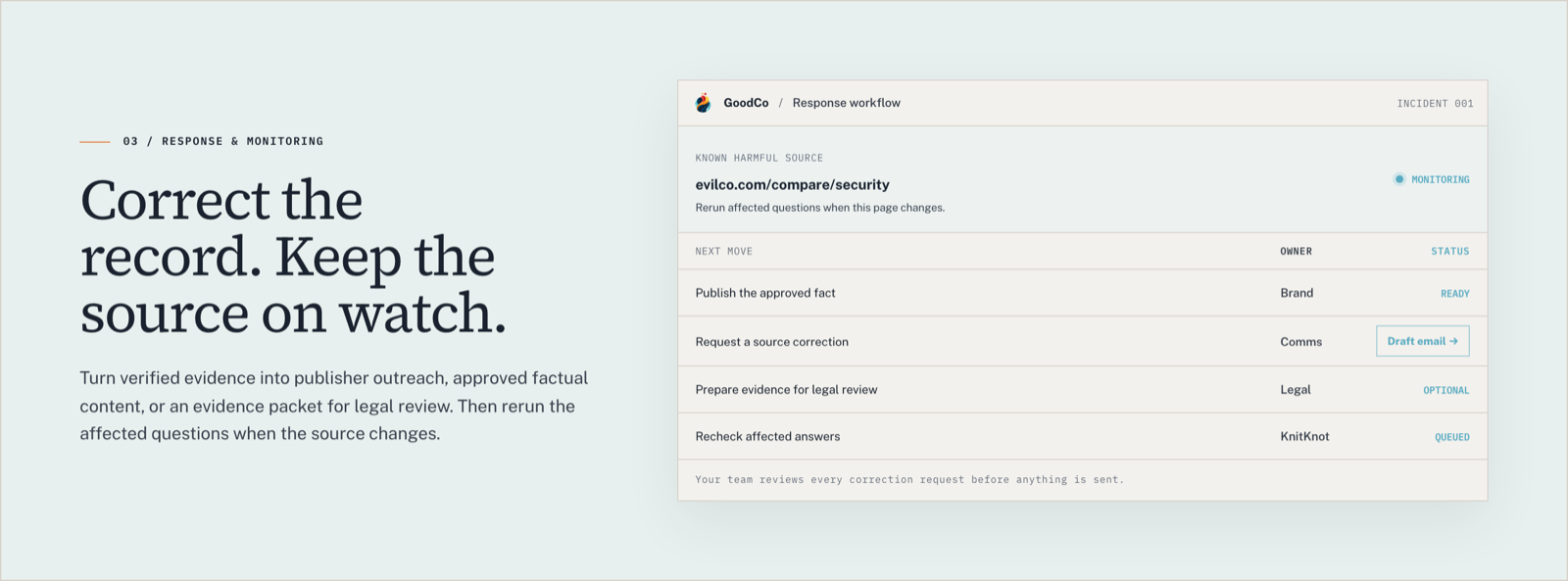
Step 7: Re-run and monitor the source, not just the answer
The correction is not done when you send the email. It is done when the claim stops appearing.
After each fix, re-run only the affected prompts on the affected engines. Log three states per claim: persists, changed, gone. Do it weekly for the first month after a correction, then monthly.
Keep the source page on watch too. Competitor comparison pages get edited. A claim you got removed can come back with different wording. If the page changes, re-run the prompts that cited it.
Do not overstate causality in your reporting. If the claim disappeared the same week a model updated, say so. Measurement that admits uncertainty gets trusted; measurement that claims credit for everything gets ignored.
Pulling this into your workflow with MCP
Everything in the table at the top of this post came from KnitKnot's MCP server, queried from inside Claude Code while I was drafting. The sequence was: list open issues filtered to misrepresentation, open each issue for the verbatim claim, engine, verdict, and cited URL, then read the full evaluation behind it.
That matters for two reasons.
First, the evidence is queryable where the work happens. A content lead drafting a comparison page can ask the agent "which claims about us appeared in lost comparisons this month" and get receipts, not a dashboard link.
Second, it closes the loop on Step 4. The same approved facts in the ledger are what the MCP serves back, so the agent that helps you write the correction is reading the record you approved, not improvising.
KnitKnot documents the setup on its MCP and integrations page. If you are on a tool without MCP, export the claim table to a sheet and paste it into the agent's context. Less elegant, same idea.
Tools, honestly
You can run Steps 1 through 7 in a spreadsheet for a first pass. I did, for about a month, before the claim extraction step ate my Fridays.
If you want software, here is the current set and where each one fits. I have no commercial relationship with any of them beyond being a KnitKnot user.
| Tool | Claims feature | Head-to-head loss linkage | Correction workflow | Who it is built for |
|---|---|---|---|---|
| KnitKnot | Claim intelligence with six verdicts, source tracing, fact ledger | Yes, per claim across adversarial comparison prompts | Owned-page fix, publisher correction request, legal evidence packet, source monitoring | B2B SaaS, Seed to growth stage. Starter $149/mo, Pro $449/mo, Enterprise by contact. |
| Profound FactCheck | Claim extraction checked against a Knowledge Base, inaccurate claims grouped by theme, source attribution | Visibility comparison, not documented at the claim level | Flags and sources; remediation is through the broader platform | Enterprise plans only, at no added cost on those plans. |
| Bluefish AI Accuracy | Continuous claim extraction and verification against a Brand Vault, severity scoring | Not documented | Hallucination reporting to AI providers, brand safety module | Fortune 500 marketing organizations. |
| Scrunch | Hallucination detection | Competitive benchmarking by persona and topic | Not documented as a workflow | Enterprise tier for hallucination detection; core tier is visibility. |
The practical difference for a Series A SaaS team: Profound, Bluefish, and Scrunch put claim accuracy behind enterprise pricing and treat it as one module inside a visibility platform. KnitKnot makes the claim the unit of work and prices it for a team of five. That is a positioning bet on defense over discoverability, and given how crowded discoverability has become, I think it is the right bet.
The extended tracking template
Add these columns to the sheet from the first guide.
Prompt family (offense / branded / head-to-head / fact probe) · H2H outcome (win / loss / tie / none) · Atomic claim · Verbatim quote · Verdict · Severity · Cited URL · Publisher · Publisher type · Attribution confidence · Approved fact · Receipt URL · Losses this claim appeared in · Response step · Owner · Sent on · Re-run status (persists / changed / gone) · Source on watch?
Prioritization: which claims to fix first
Score each inaccurate, outdated, or misleading claim on four things, 1 to 5 each.
- Deal relevance. Security, pricing, and integration claims outrank positioning nuance.
- Loss count. How many head-to-head losses it appeared in.
- Fixability. Grounded (there is a page you can change or a publisher you can email) beats parametric (no citation).
- Spread. Number of engines and number of distinct prompts repeating it.
Fix grounded, high-loss, high-relevance claims first. Park parametric claims in a watch list and stack owned-page corroboration against them over time.
Recommended cadence
Weekly, re-run defensive prompts on the engines that matter to your buyers, extract new claims, and update re-run status on open corrections.
Monthly, review the fact ledger for freshness, send batched correction requests, publish or refresh the owned pages that carry your highest-priority facts, and report claim accuracy alongside visibility.
Quarterly, rebuild the defensive prompt set: add new competitors, new decision criteria, and any claim category that showed up unexpectedly.
The best resources I used
- KnitKnot: Claim Intelligence, including the six verdict categories and the attribution ladder.
- KnitKnot: Fact Ledger.
- KnitKnot: Methodology, on baseline freezing and "insufficient data is a result."
- KnitKnot vs Profound comparison page.
- Profound: Introducing FactCheck.
- Profound Knowledge Base: About FactCheck.
- Bluefish: AI Accuracy launch.
- Scrunch AI.
- SuperMarketers: AEO keyword research and prompt tracking, the offensive half.
The loop from the first guide still holds: identify buyer conversations, track the prompts, see what AI trusts, diagnose gaps, fix, re-run.
Claims intelligence adds one step that changes the character of the whole system. Before you write more content, read what the answer already says about you, check it against the facts you can prove, and find out who put it there.
If you want to see what AI is repeating about your company, KnitKnot runs a one-time scan across ChatGPT, Perplexity, and Gemini that returns the negative claims, their sources, and the buyer comparisons they appear in. Start there, then bring the claims to a sheet or a workspace and run the ladder.