Between Monday morning and Tuesday morning this week, GrowthX rewrote its homepage.
"A System of Growth for B2B Marketing" became "Organic Growth Platform for SEO and AI Visibility." The headline moved from "you need a system of growth" to "turn buyer questions into compounding growth."
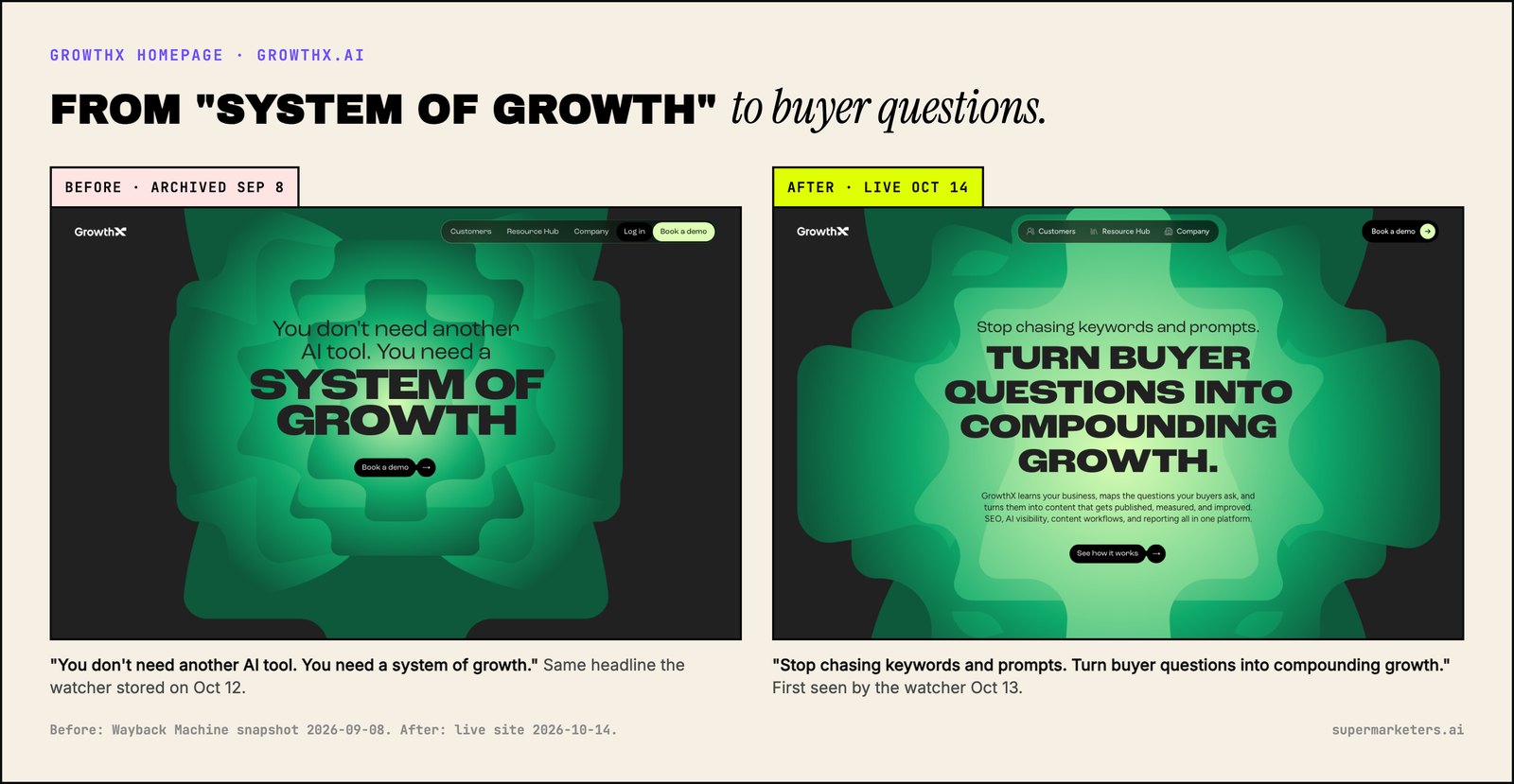
I caught it because a script I run every morning reads twelve competitors' websites and flags what changed. But the homepage turned out to be the least interesting thing it could tell me. GrowthX's docs said far more about where the product is going than the new headline did.
This post is the playbook I wish I'd had before building it: which pages to watch on a SaaS competitor, what a change on each one means, and who on your team should do something about it.
What should a SaaS company monitor on competitors' websites?
Watch the pages where a competitor makes decisions, not the pages where they publish content. In order of how much they tell you:
- Docs and API reference. What the product actually does today.
- Pricing. Who they're selling to and how.
- Homepage title and headline. How they want to be positioned.
- Launch posts. The product behind a new headline.
- Changelog. How fast they ship and where.
- Comparison and "best X for Y" pages. Who they're targeting at decision time.
- Research. What they want to be known and cited for.
- Careers. Where the money goes next.
Most of everything else is noise. In the first six days, my watcher logged 71 changes across 12 competitors: blog posts, minor pages, removals. Only 8 touched a page on this list.
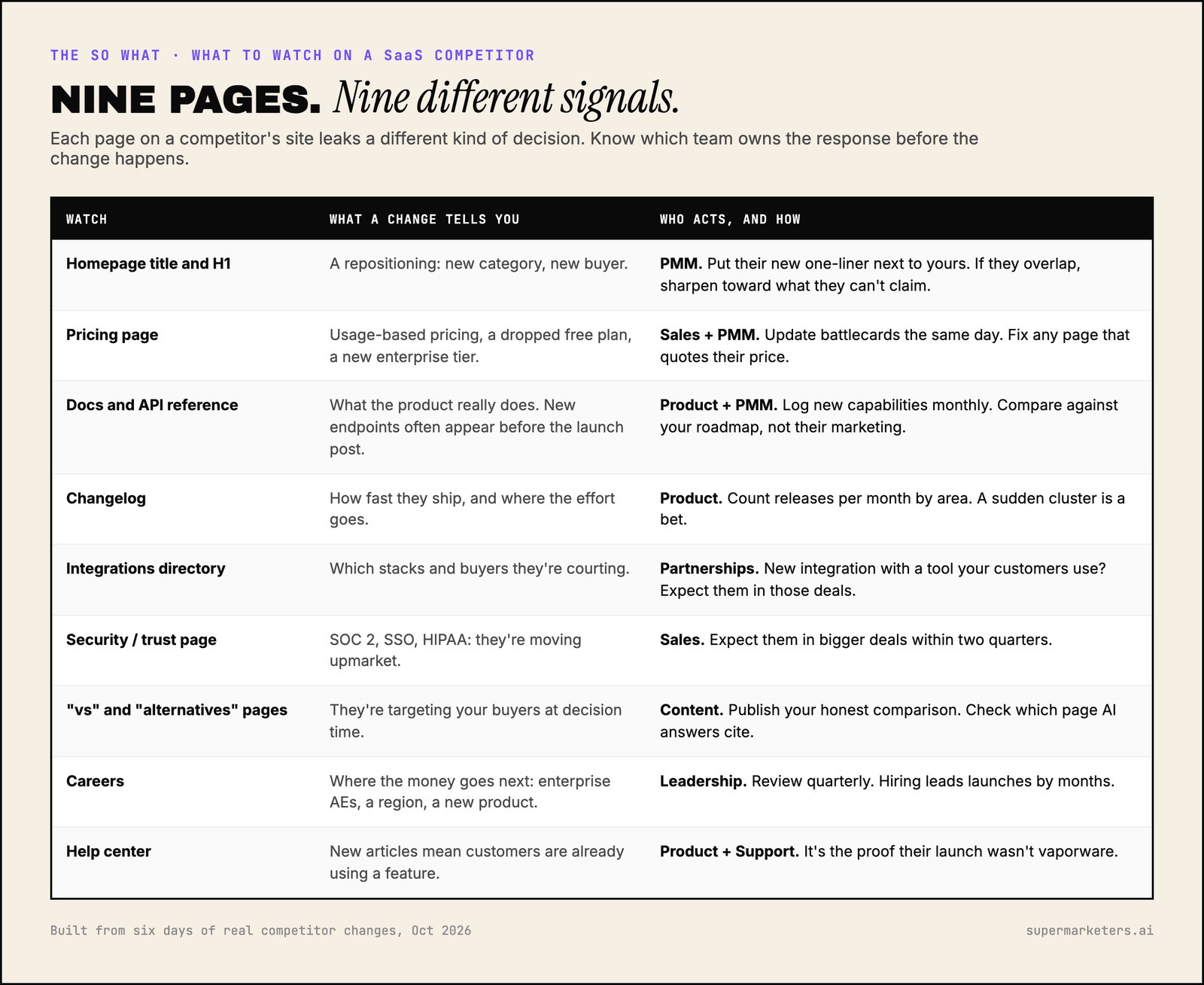
The rest of this post goes through each one with a real example from this week.
1. Docs: the homepage is the pitch, the docs are the product
A homepage is written to persuade. Docs are written for people using the product, so they have to describe what it actually does. That makes them the most specific page a competitor publishes.
GrowthX's docs sitemap lists 74 pages, split into product docs and a step-by-step tutorial. Read next to the new homepage, they tell a much more specific story:
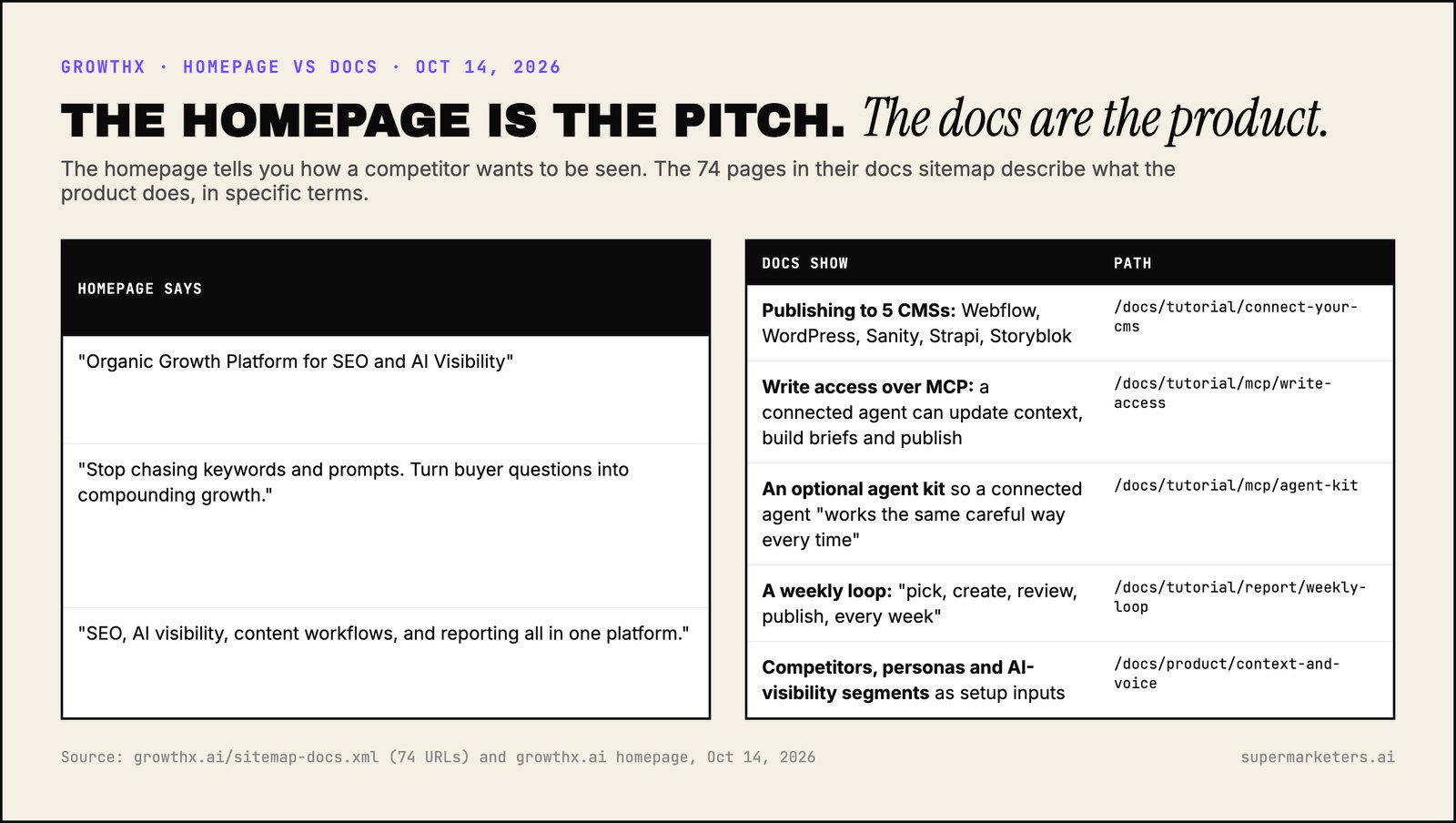
The homepage says "SEO, AI visibility, content workflows, and reporting all in one platform." The docs show what that means in practice:
- One-click publishing to five CMSs: Webflow, WordPress, Sanity, Strapi and Storyblok.
- Write access for your own agent over MCP. In GrowthX's words, an agent can "update context, build briefs, triage opportunities, start agent runs, and publish through your connected CMS," from "the Claude project, Claude Code session, or agent workflow you already run."
- An optional agent kit "so your connected agent works the same careful way every time."
- A weekly loop: "pick, create, review, publish, every week."
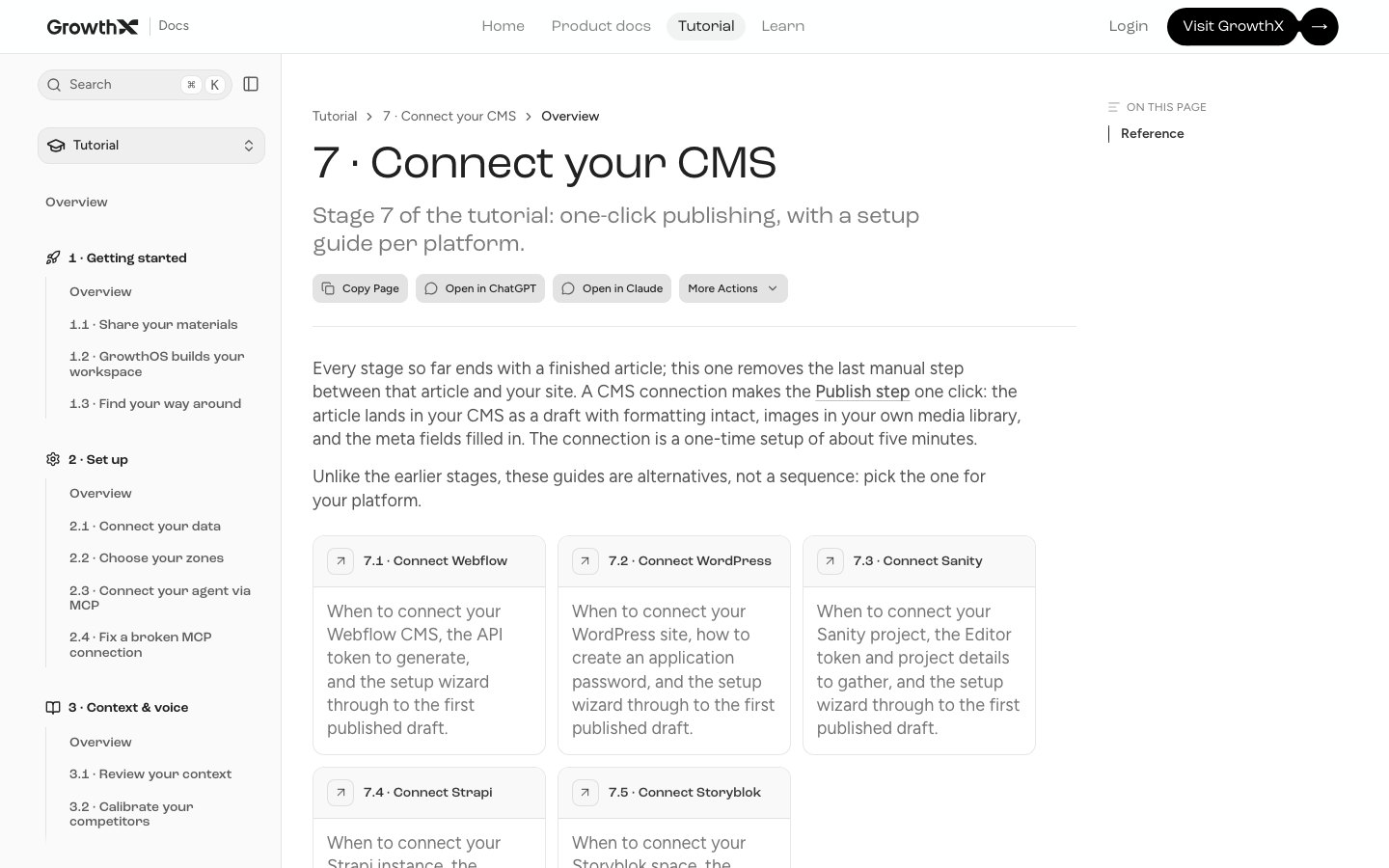
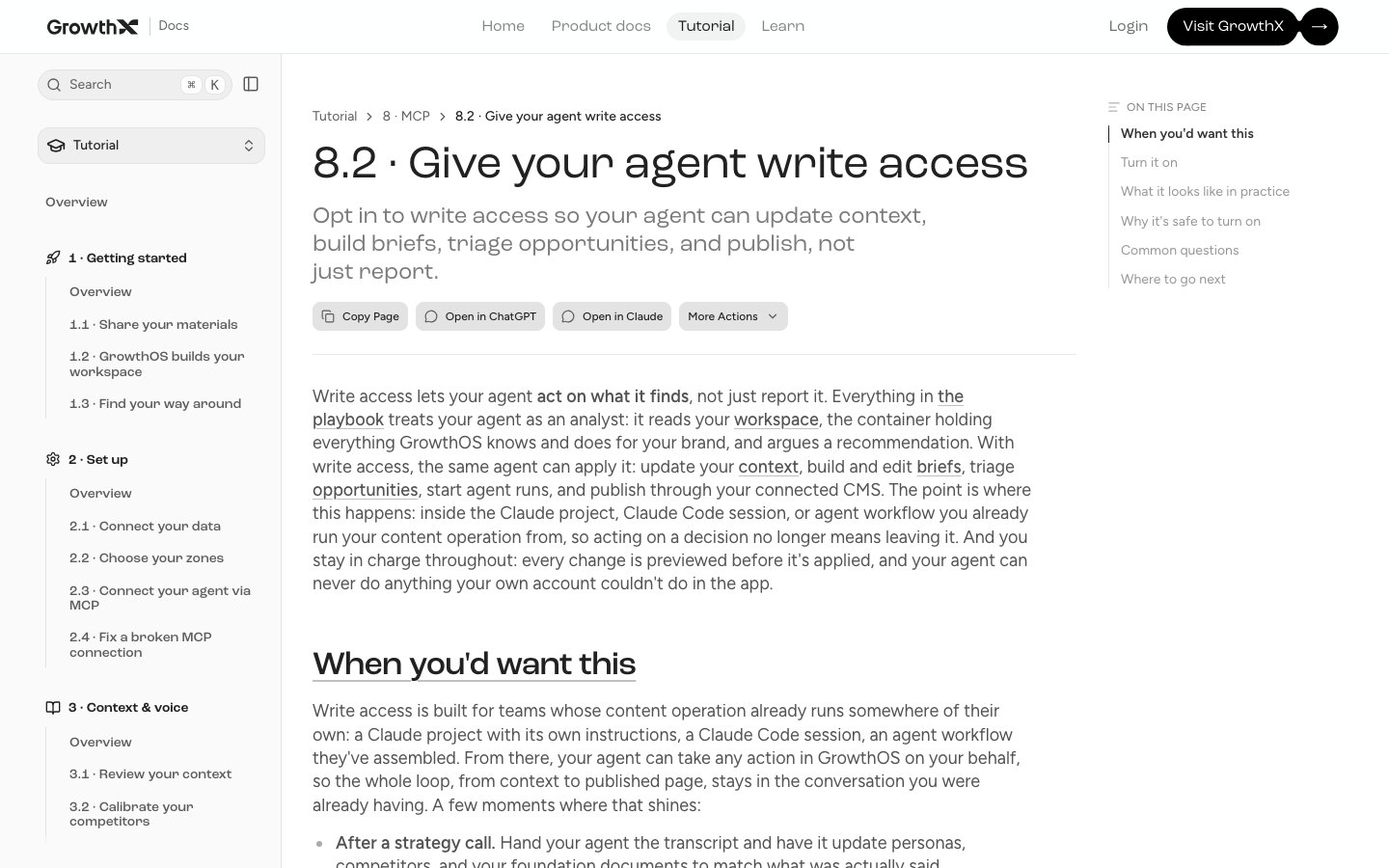
The agent access is the detail I'd have missed. The homepage doesn't mention MCP, Claude or the CMS integrations at all. The docs show GrowthX building for teams who work from inside their own AI agents. If you compete with GrowthX, that tells you more than the headline does.
Docs on a separate subdomain are easy to miss. Boring Marketing's main sitemap lists 7 pages. Its docs site, docs.boringmarketing.com, lists 58, including a full API reference:
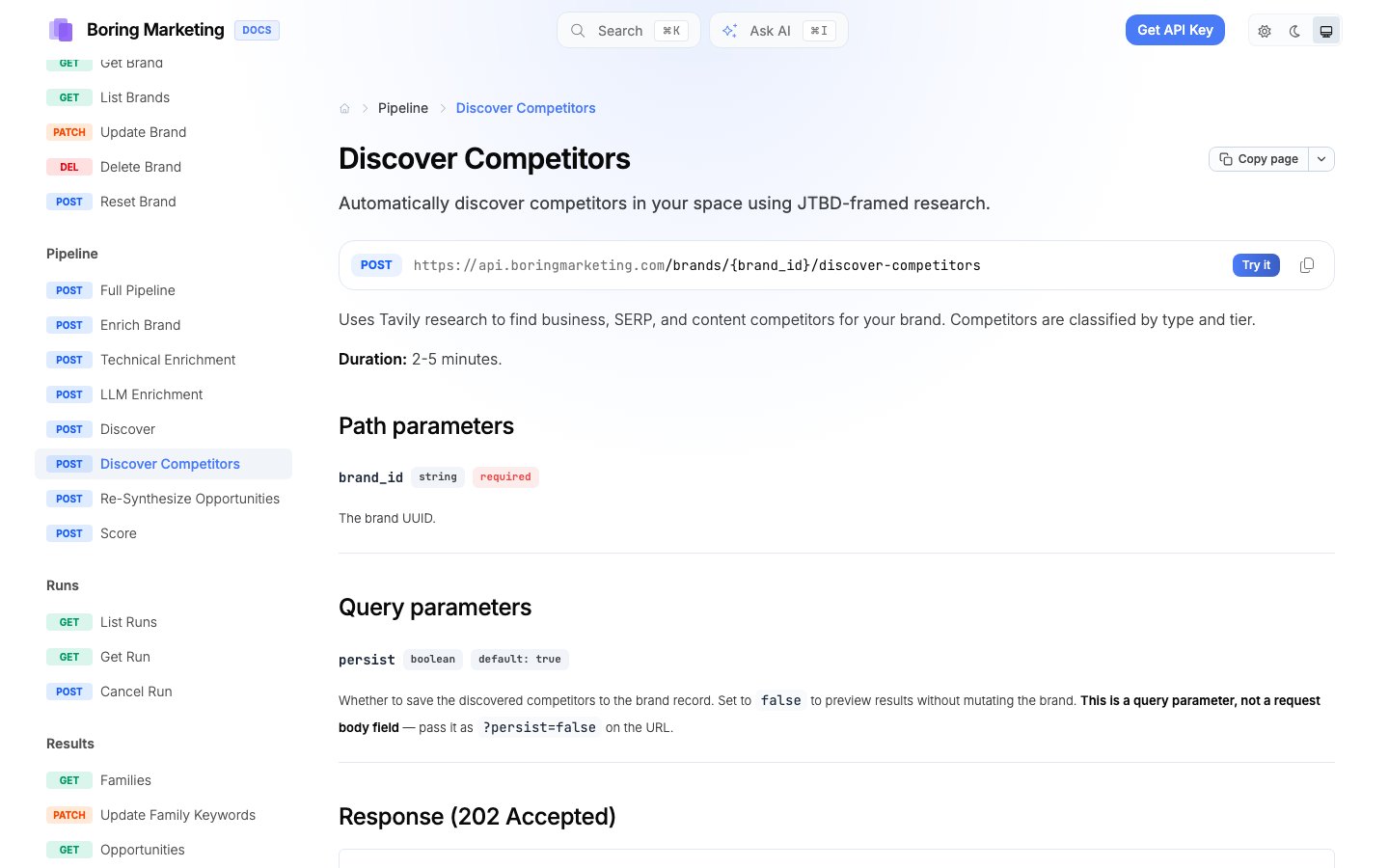
What to do: check a competitor's docs sitemap for new sections once a month. A new top-level docs section is a new product area, often before the marketing catches up.
2. Pricing: who they're really selling to
Pricing pages change less often than anything else, which is why a change matters. Watch for:
- Moving from seats to usage or credits
- A free plan disappearing, or a new one appearing
- A new "enterprise" tier with "contact us"
- What's bundled at each tier
Boring Marketing's pricing page is one plan: $99 a month for 1,000 credits, with "competitor intel" listed next to SEO, content and LLM visibility.
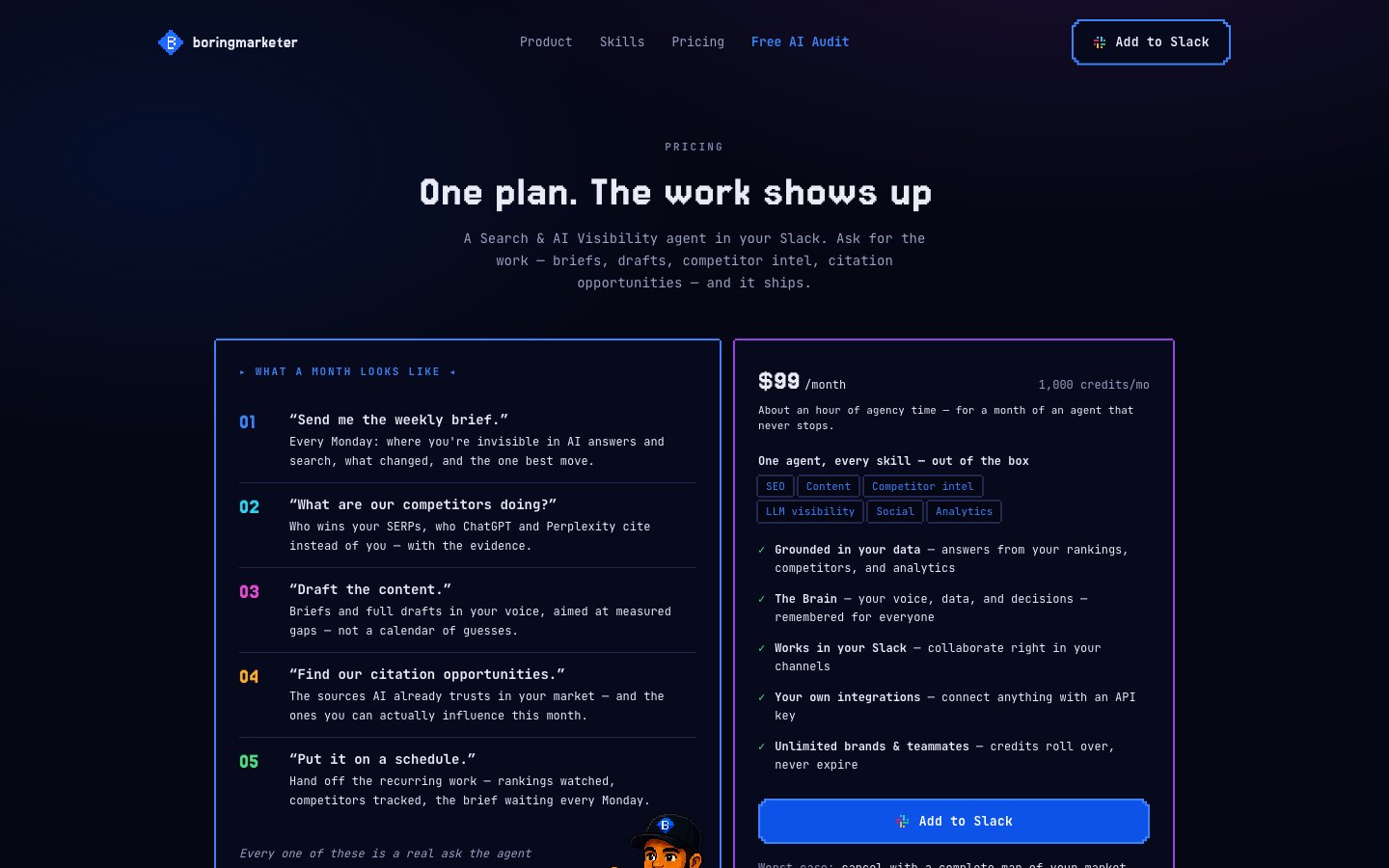
If you sell to the same buyer at a higher price, that page is now part of your deals. Your buyer has seen "competitor intel" as a line item in a $99 product, and your sales team needs an answer for it.
What to do: when a competitor's pricing page changes, brief sales the same day and update every battlecard and page that quotes their price.
3. Homepage: positioning, in one line
The homepage title and H1 are where a repositioning shows up first. Here's what my watcher stored for GrowthX on Oct 12 versus Oct 13:
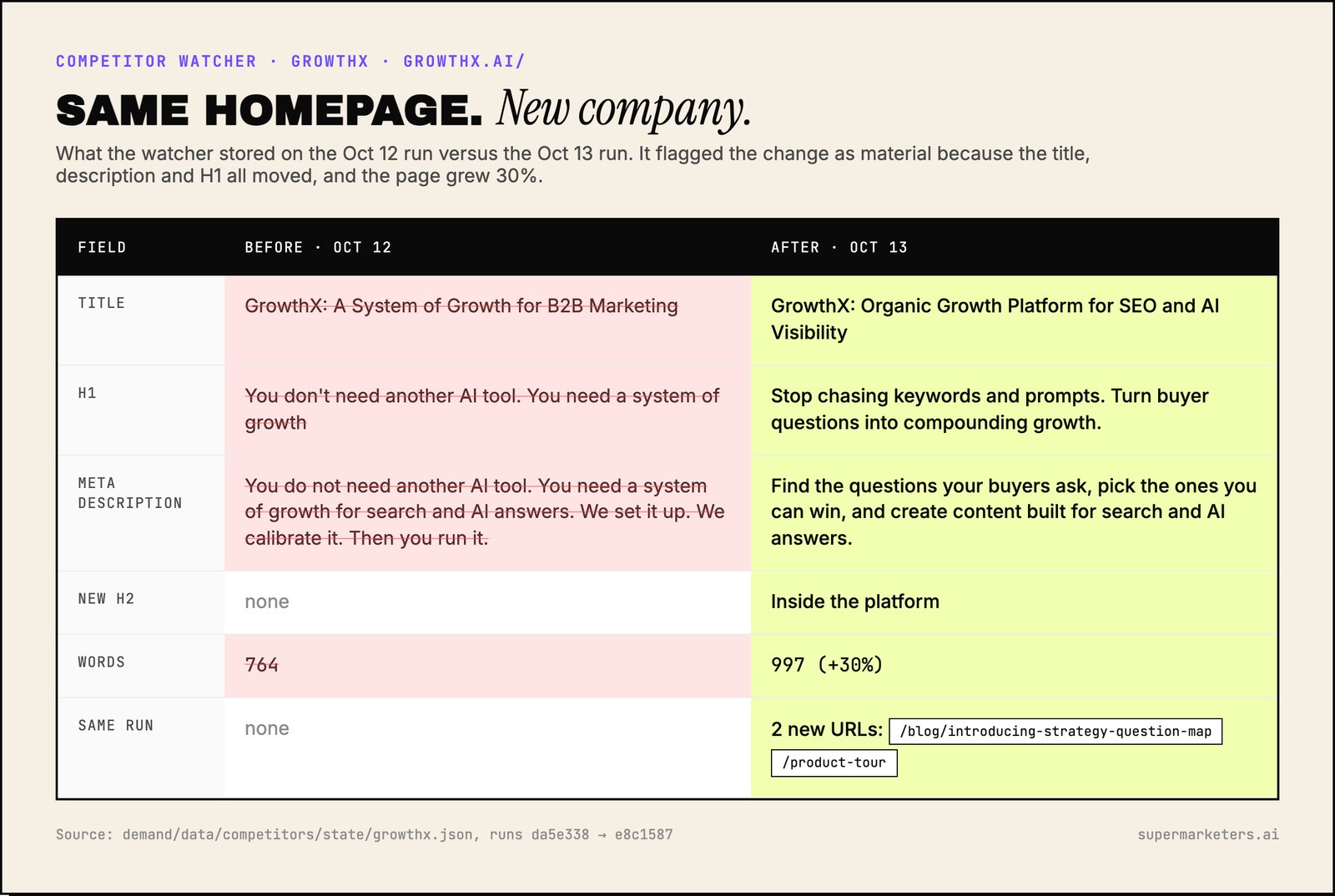
Three things changed at once: the title, the meta description and the H1. The copy also grew 30%, from 764 words to 997. When all three move together, it's a decision, not a tweak.
What to do: write their new one-line claim next to yours. If the two now overlap, sharpen yours toward the part they can't claim.
4. Launch posts: the move behind the headline
The homepage change didn't happen alone. The same run picked up two new GrowthX pages: a product tour, and a post dated Oct 12, "New at GrowthX: the Strategy layer and Question Map".
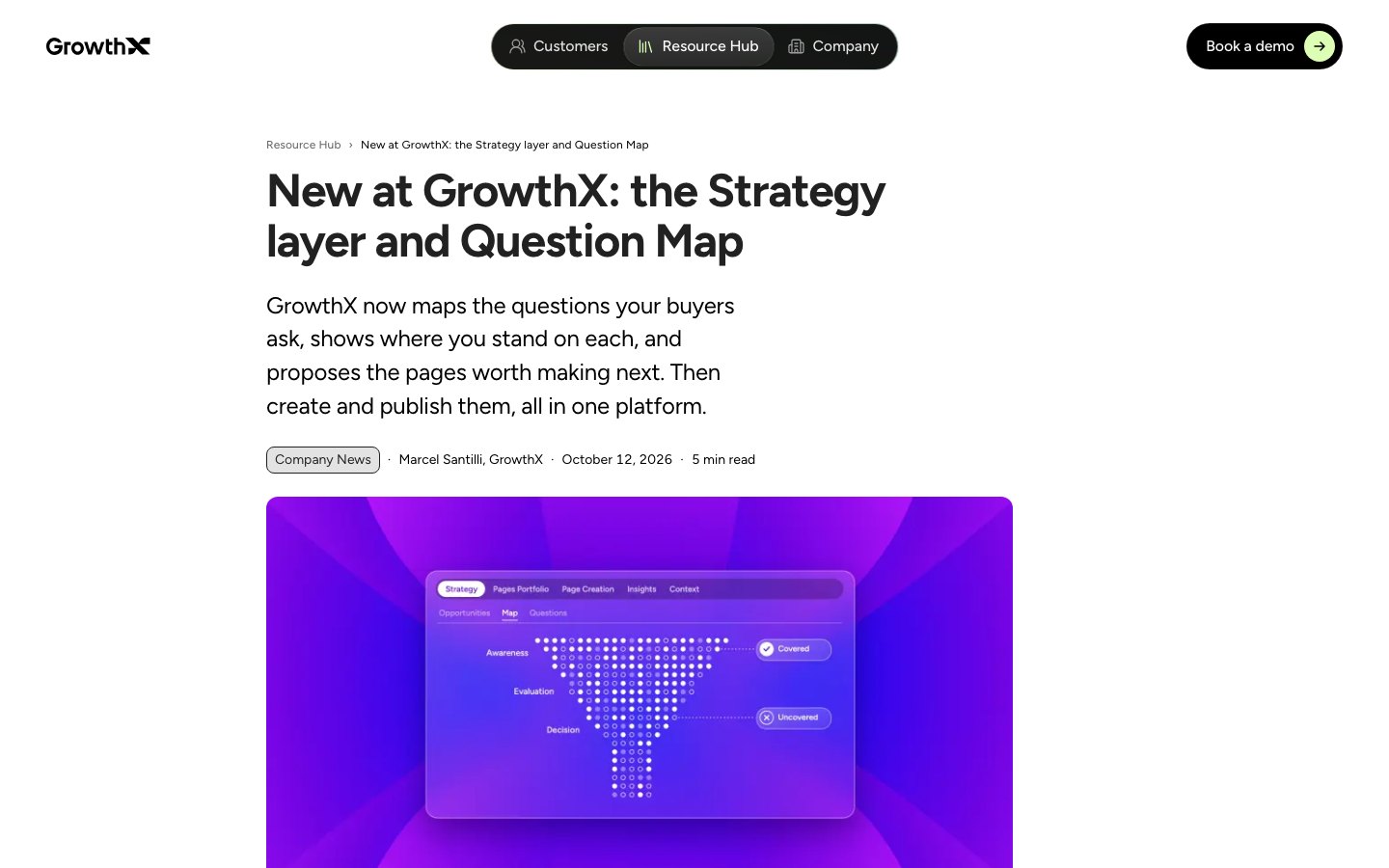
The Question Map maps the questions a company's buyers ask, shows where they stand on each, and proposes the next pages to make. The new homepage headline, "turn buyer questions into compounding growth," lines up with it, and the homepage now features the launch post.
That's the pattern to look for: a homepage repositioning often has a launch behind it. Watch only the homepage and you see the claim. Watch new pages too and you see the product that backs it up.
5. Changelogs: how fast they ship
I couldn't find a public changelog for any of my twelve competitors. Most of them are agencies. For SaaS competitors it's one of the most useful pages there is, because every entry is dated and specific.
Don't read every entry. Count them:
- Releases per month. Is the team speeding up or slowing down?
- Releases by area. Five integration releases in a month is a bet.
- Gaps. A changelog that goes quiet for two months often means a big launch is coming, or the team got smaller.
What to do: have product look at the count once a month. A sudden cluster in one area tells you their next launch.
6. "Best X for Y" and comparison pages: a land grab
On Oct 10, three new GrowthSpree pages appeared on the same day: best AEO, GEO and SEO agency for B2B SaaS.
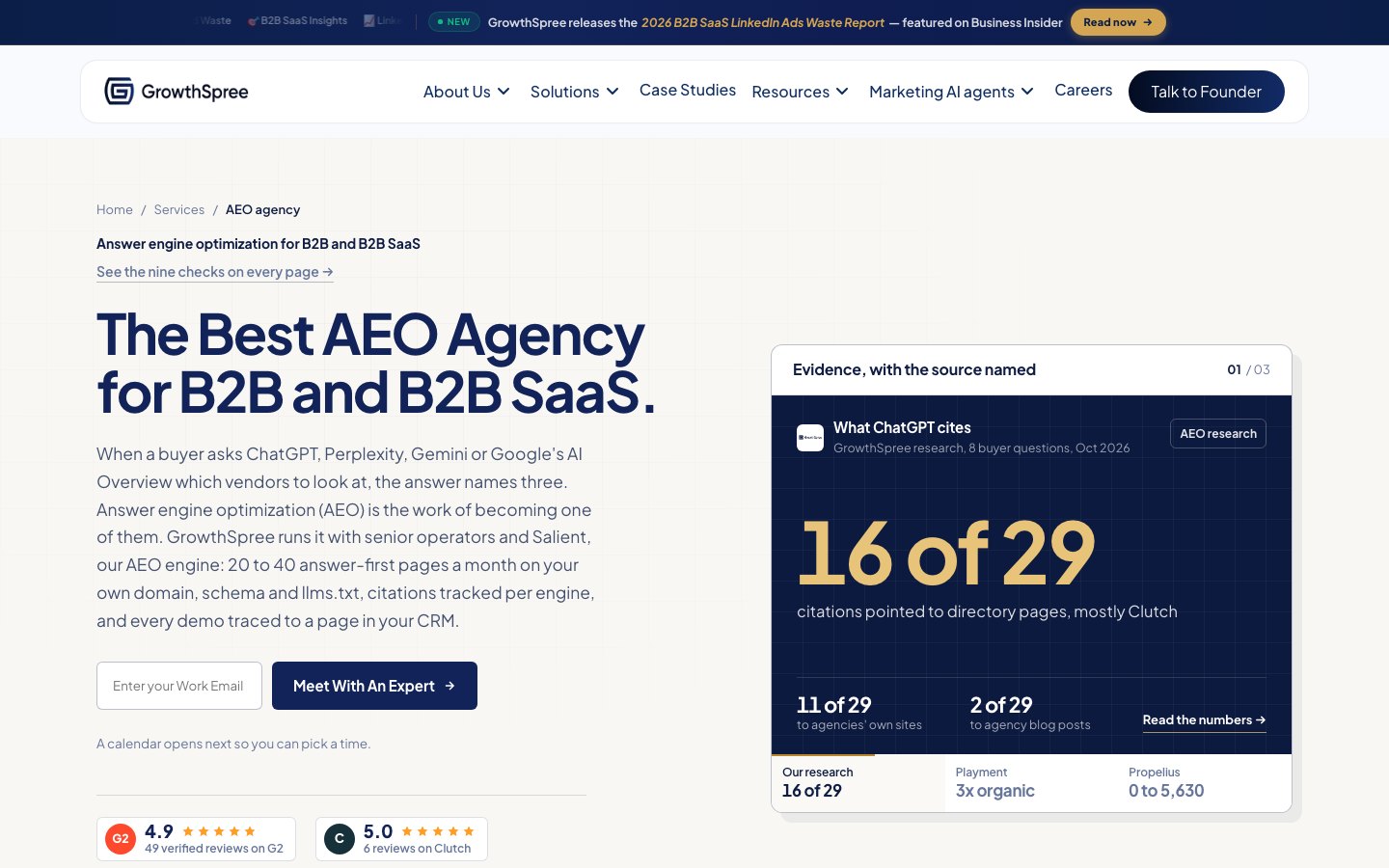
Pages like these are built to be cited when a buyer asks ChatGPT or Perplexity "who's the best X for Y." Three published together is a deliberate attempt to own a category's AI answers.
What to do: respond to a set with a set. One page won't compete with three. And check which pages AI answers actually cite for those questions before you decide what to write.
7. Research: what they want to be cited for
On Oct 9, my watcher picked up a new TripleDart page: "Do Niche B2B Industries Get Cited More by AI? 2026 Study."

Original research is among the content AI engines cite most readily. (More on why ChatGPT cites some companies over others.) A competitor publishing a study in your category is trying to become the source the answers point to.
What to do: publish your own data, or a point of view on their method, within a couple of weeks. The sooner you respond, the better your chance of being cited alongside them.
8. Careers: where the money goes next
On Oct 14, GrowthSpree added job pages for an Account Executive and a Business Development Representative, plus a press page.
Two sales roles posted on the same day tells you more about their next quarter than any blog post. It suggests they're investing in outbound, so you may see them in more deals.
What to do: look at competitors' careers pages once a quarter. Enterprise AEs mean they're moving upmarket. A new region means expansion. A product marketer for a new line means a launch.
Did it change the AI answer?
A competitor changing its website only matters if it changes what buyers see. More and more, what buyers see is an AI answer.
So for any change that matters, ask a second question: did the AI answers move? If GrowthX now calls itself an "AI Visibility" platform, check over the next few weeks whether ChatGPT and Perplexity start recommending it for AI visibility questions.
That's the useful split:
- Website monitoring tells you what a competitor did.
- AI visibility tracking tells you whether it worked.
You need both to know whether to respond. If you're starting from zero, build a prompt tracking list from your buyers' real questions first.
How to set this up
You can buy this or build it.
| Option | Good for | What it won't do |
|---|---|---|
| Page-change monitors (Visualping and similar) | Watching a handful of specific pages, like pricing, and emailing you when they change | Tell you whether a change matters |
| Competitive intel platforms (Klue, Crayon and similar) | Sales teams keeping battlecards current | Fit a small team's budget. Built for sales more than marketing |
| SEO tools (Semrush, Ahrefs) | New competitor pages that rank, and keywords they gained | Positioning, pricing or docs changes |
| AI visibility trackers | Whether competitors get cited for your buyers' questions | What changed on their site to earn it |
| Wayback Machine | A free "before" when you didn't save one | Coverage. It had one GrowthX snapshot in two months |
| Build it with Claude Code | Exactly the pages and rules you care about | Run itself. You maintain it |
Here's how mine works. It's about 420 lines of Python, it runs every morning, and it uses no paid APIs. It's part of the buyer-question system that decides what I write next, and the wider system is open source on GitHub.
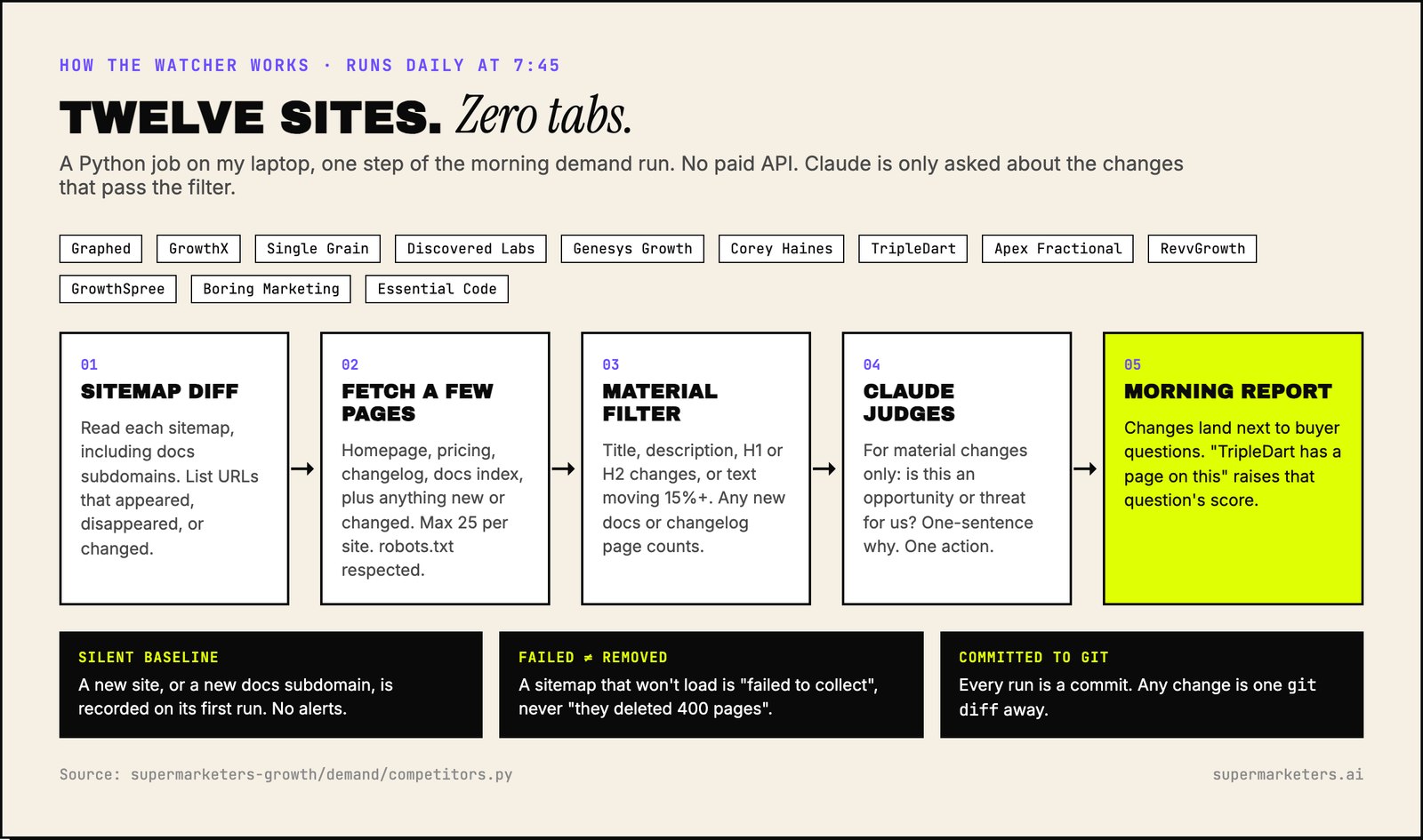
If you build your own, four things matter more than the code:
- Include docs subdomains. Read
docs.competitor.com/sitemap.xmlas well as the main sitemap. My watcher missed Boring Marketing's 58 docs pages until this week because they live on their own subdomain. - Filter hard. Only count title, description, headline and section changes, or text moving more than 15%. Treat any new docs or changelog page as important. Ignore everything else.
- Record new sources silently. The first time you add a site or a docs subdomain, record what's there without alerting. Otherwise day one is hundreds of false alarms.
- Keep the history. Commit every run to git, or save dated snapshots. The Wayback Machine had one copy of GrowthX's homepage in two months. My own history had the exact before and after.
What I learned running one
I'll be honest about how I've used mine so far.
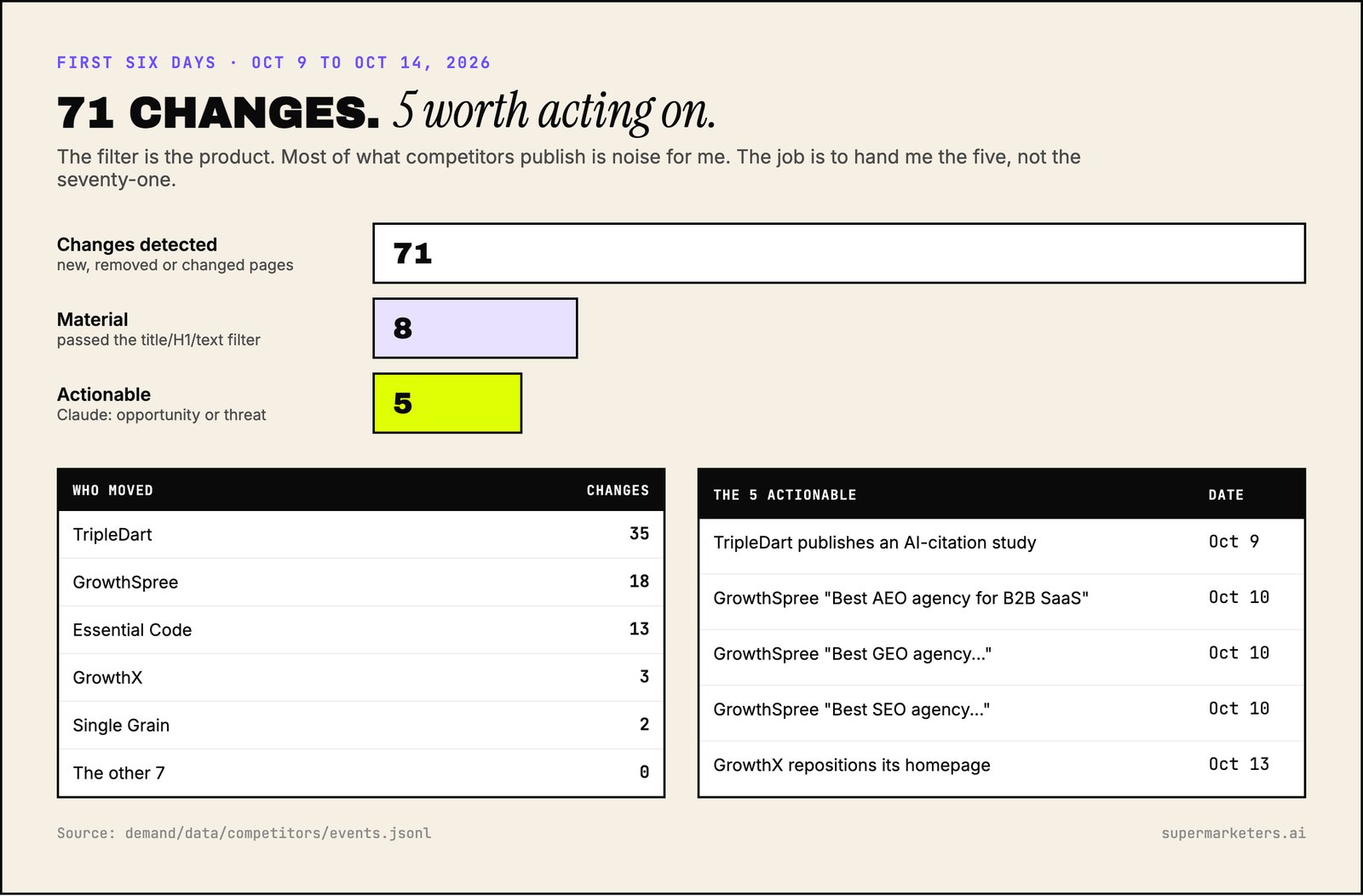
In six days it found 71 changes. Eight passed the filter. Five were worth acting on. I haven't acted on any of them yet.
That's the real lesson. Detecting changes is the easy part now. A script does it for free. The hard part is deciding in advance what you'll do when a competitor moves, and who does it. Without that, a competitor watcher is just a well-organised feed you don't read.
So write the response table first. Decide who owns a pricing change, a docs expansion, a "best X" page set. Then build or buy the monitoring. It'll be useful from day one instead of becoming one more dashboard.
FAQ
How often should you check competitors' websites?
Daily for homepage and pricing, if it's automated. Monthly for docs and changelogs, which change in batches. Quarterly for careers pages. By hand, weekly is realistic. Monthly is when you start missing things.
What's the most underrated page to watch?
Docs. They're written for people using the product, so they describe what it does today in specific terms. New sections can also appear before a launch is announced.
How many competitors should you track?
Five to twelve. Pick by who shows up in your deals and in AI answers to your buyers' questions, not by who's biggest.
Can you track competitor pricing changes automatically?
Yes. Fetch the pricing page daily, save the title, headings and visible text, and flag when the headings change or the text moves by more than about 15%. Most page-change monitors can do this for a few pages.
Should you respond to every competitor change?
No. Of 71 changes in my first six days, five were worth acting on. Decide your responses by page type in advance, and ignore the rest.