Every AI tool has the same weakness. It's only as good as the context you hand it, and most marketers hand it context one chat at a time. You paste the brand voice again. You re-explain the ICP again. You dig through last month's thread for the positioning you finally got right.
For a while my files lived wherever the conversation happened. A research run ended up next to a client deliverable. A half-formed idea about AI search sat in the same folder as my pricing. The AI couldn't tell which was decided and which was a guess, so it treated them the same.
Today everything I do, for my own marketing and for clients, lives in three homes. Each has one job. Each has a short instruction file the AI reads before it does anything. Here's the whole thing on one page:
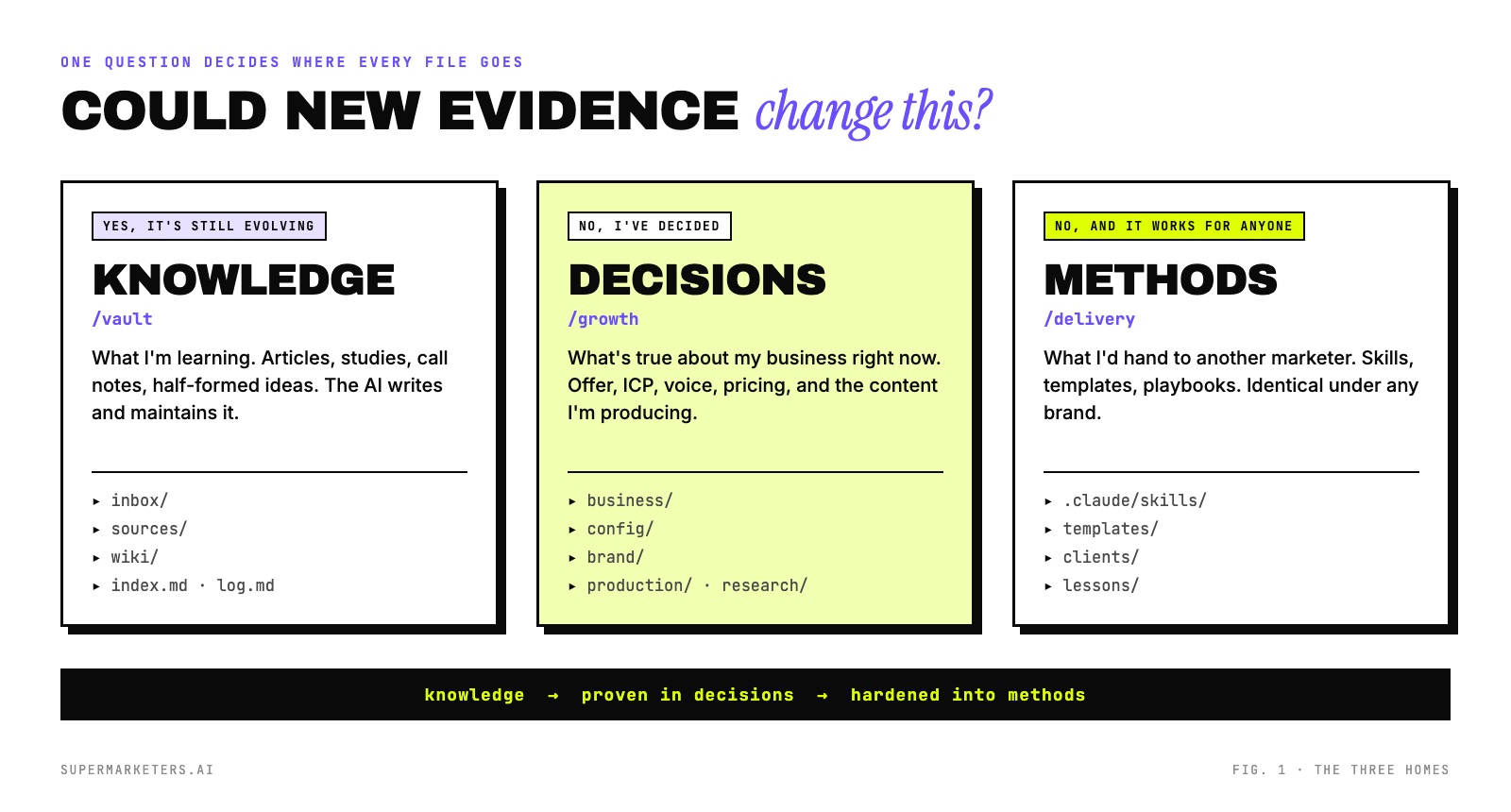
How I ended up with three folders after four reorganizations
I didn't design this up front. I can see every step of how I got here in my commit history, because each restructure fixed a specific mess.
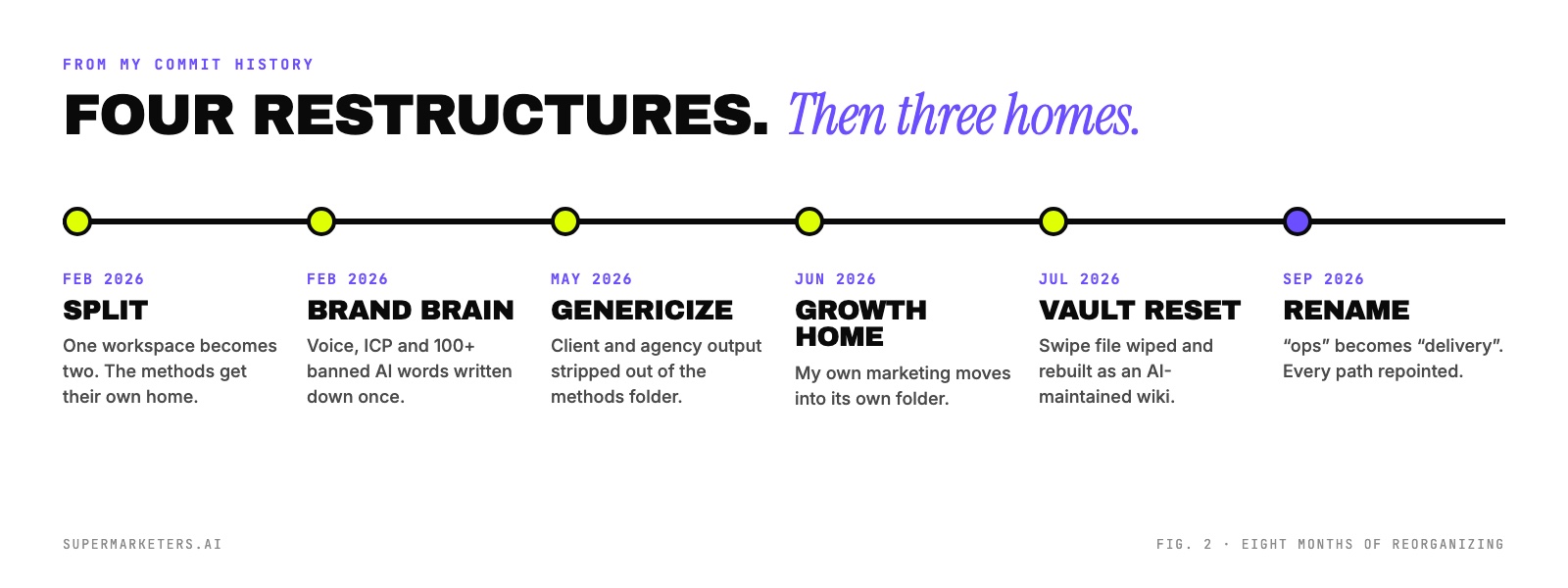
- February: the split. Everything started in one workspace folder. The first thing I pulled out was the methodology: the agents, templates and playbooks I'd reuse on any client. A week later I wrote my brand brain, a single reference doc for voice, ICP and over 100 banned AI phrases, so I'd stop pasting it into every chat.
- May: genericize. The methods folder had quietly filled up with client output and my own agency drafts. A reusable playbook sitting next to one client's research isn't reusable, because the AI pulls both in. I stripped everything client-specific out.
- June: a home for my own growth. My own marketing (offer, pricing, the content I publish) moved into its own folder. It had been treated as just another client.
- July: the vault reset. I had an Obsidian swipe file nobody maintained, including me. I wiped it and rebuilt it as a wiki the AI writes and keeps current.
- September: the rename. The methods folder was called "ops". That told the AI nothing about what was inside. I renamed it "delivery" and repointed every path that referenced it.
Every one of those fixes was the same fix. I was separating things that change from things that don't, and things that belong to me from things that belong to anyone.
How I sort every file with one question
When something new shows up, whether it's an article, a call transcript, a draft or a decision, I ask one question: could new evidence change this?
- Yes, it's still evolving. It goes in the vault. That's knowledge: what I'm learning about AI search, what buyers told me, what a study found. It's allowed to be wrong and get corrected.
- No, I've decided. It goes in growth. That's my business as it stands: the offer, the pricing, the ICP, the voice guide, and the content I'm producing. When the AI reads this folder, it's reading facts, not opinions.
- No, and it would work under any brand. It goes in delivery. That's method: skills, templates, checklists, the client folder template. If I swapped my logo for yours, nothing in there would change.
The part that took me longest to learn is the rule in my instruction file: route by type, not by where the conversation happened. A single client call can produce a decision, a learning and a reusable method. They go to three different places, even though they came out of one conversation.
How I gave every folder its own instruction file
This is the piece that makes the structure work with AI and not just for me. At the top of each home there's a short file the AI reads before it does anything else. In Claude Code it's called CLAUDE.md. In other tools it's project instructions, a rules file or AGENTS.md. Same idea.
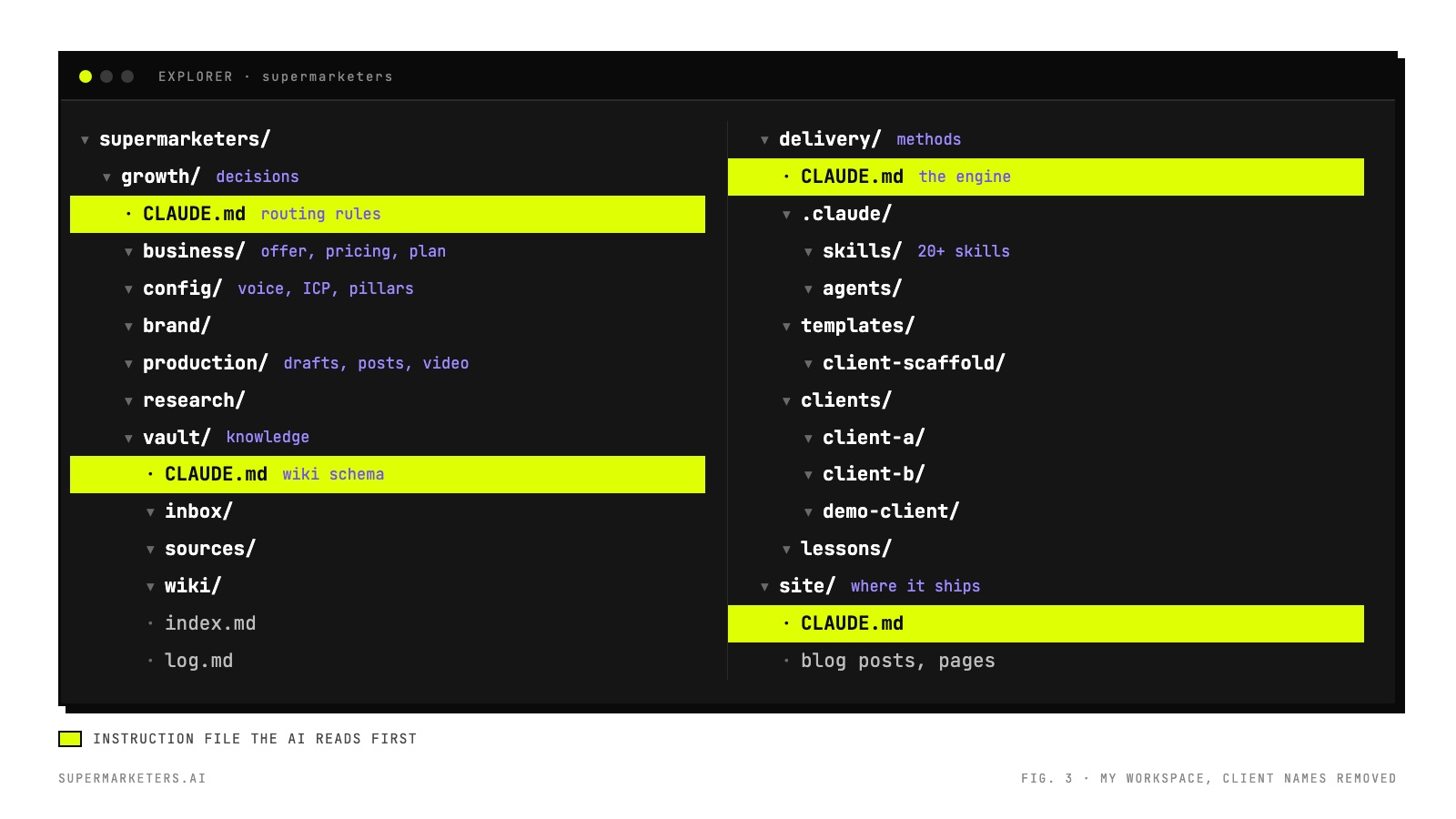
Each instruction file answers three questions and nothing else:
- What is this folder for? One sentence, and how it relates to the other two homes.
- Where does each kind of thing go? The subfolders, and the routing rules for anything new.
- How do we write here? My style rules: no em dashes, no banned AI phrases, no number without a source.
Here's the one at the top of my growth folder, shortened:
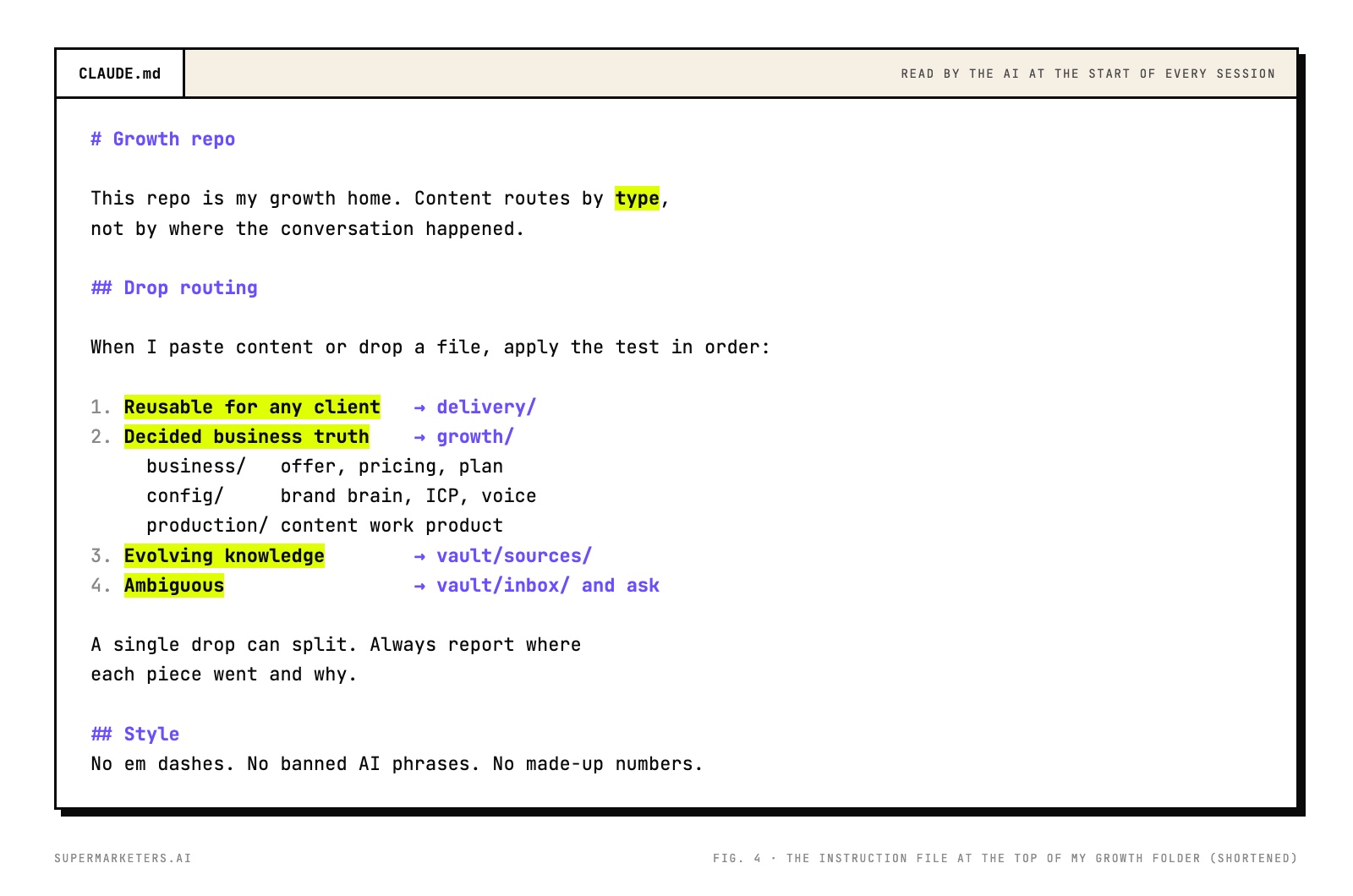
Notice rule four. When the AI can't tell where something belongs, it doesn't guess. It parks the item in the inbox and asks me. That one line has saved me from more mis-filed work than anything else in the file.
How I route anything I paste in
Day to day, I almost never pick a folder myself. I paste something in and say "file this". The AI applies the routing rules and tells me where each piece went and why.
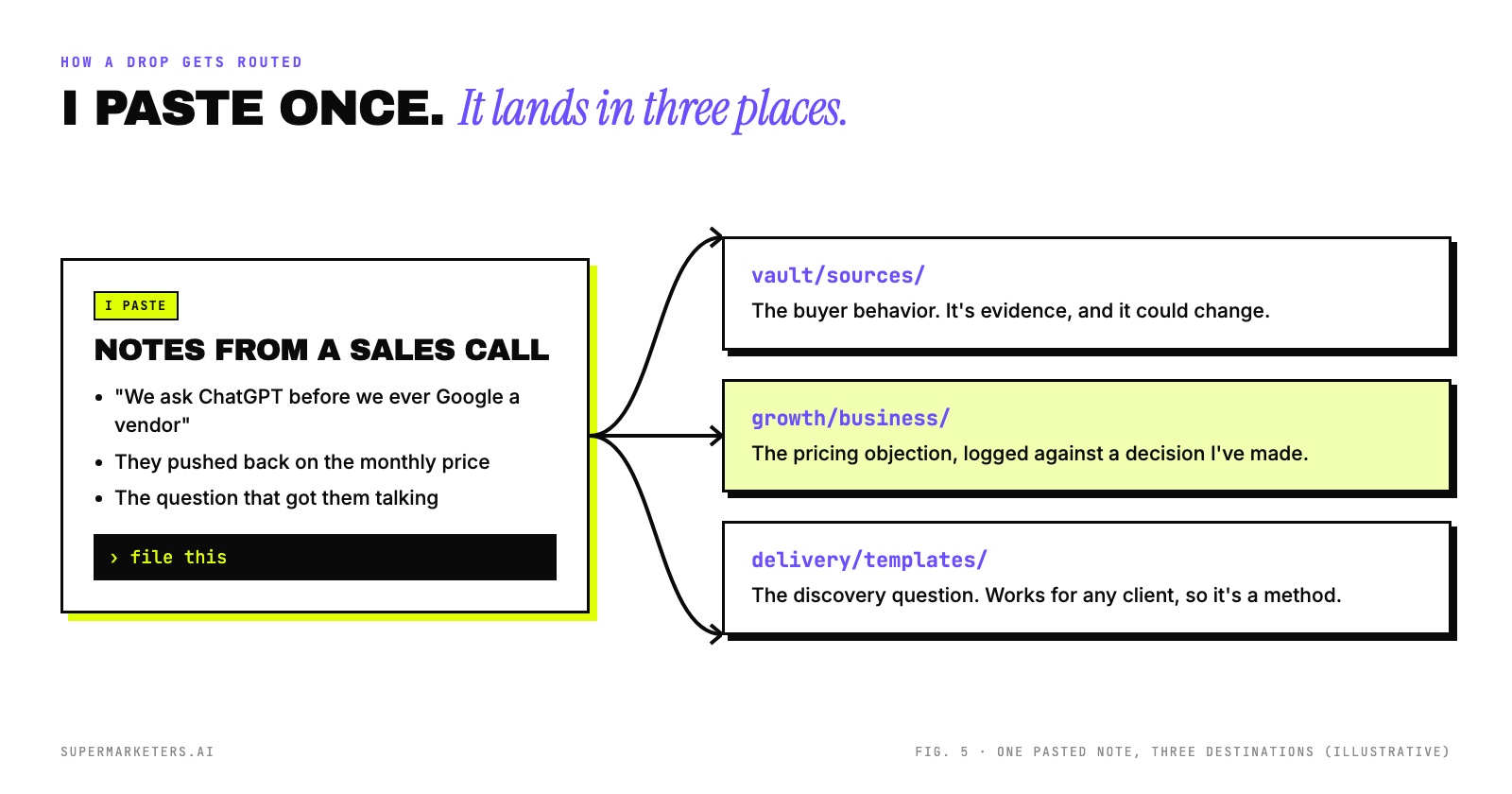
File this. If it splits, split it. Tell me where each piece went and why, and ask me about anything you're not sure of.
The "tell me why" part matters. Reading the AI's reasoning is how I catch the times it treated an opinion as a decision. It's also how I noticed my rules had gaps. Each time I corrected a routing call, I updated the instruction file, so I only had to correct it once.
How I built a second brain the AI maintains
The vault is the home I rebuilt most recently, and I didn't invent the pattern. It comes from Andrej Karpathy's LLM Wiki gist, published in April 2026. He describes it as "an idea file", something you paste into your own AI agent and let it build from. The line that sold me:
His point is that you stop writing your notes yourself. In his words: "You never (or rarely) write the wiki yourself." The LLM "writes and maintains all of it", and you're "in charge of sourcing, exploration, and asking the right questions." That was exactly my problem with the old swipe file. I was the only one who could maintain it, so nobody did.
Karpathy's pattern has three layers, and my vault maps onto them one to one:
| Karpathy's layer | What it is | In my vault |
|---|---|---|
| Raw sources | Documents you curate. Never changed. | sources/, dated filenames, read-only |
| The wiki | Markdown pages the LLM writes and updates | wiki/, split into aeo, agency, channels, clients and tools |
| The schema | A document telling the LLM how the wiki is structured and which workflows to follow | CLAUDE.md at the top of the vault |
| index.md + log.md | A catalog of every page, and an append-only record of every ingest and update | Same names, same jobs |
I open the whole folder in Obsidian to read it. Every page links to others with [[wikilinks]], so the graph view shows which ideas connect. But Obsidian is just the reader. Claude Code does the writing, and the files are plain markdown that any AI tool can open. What I added on top of Karpathy's version is the inbox/ and the routing out to my other two homes.
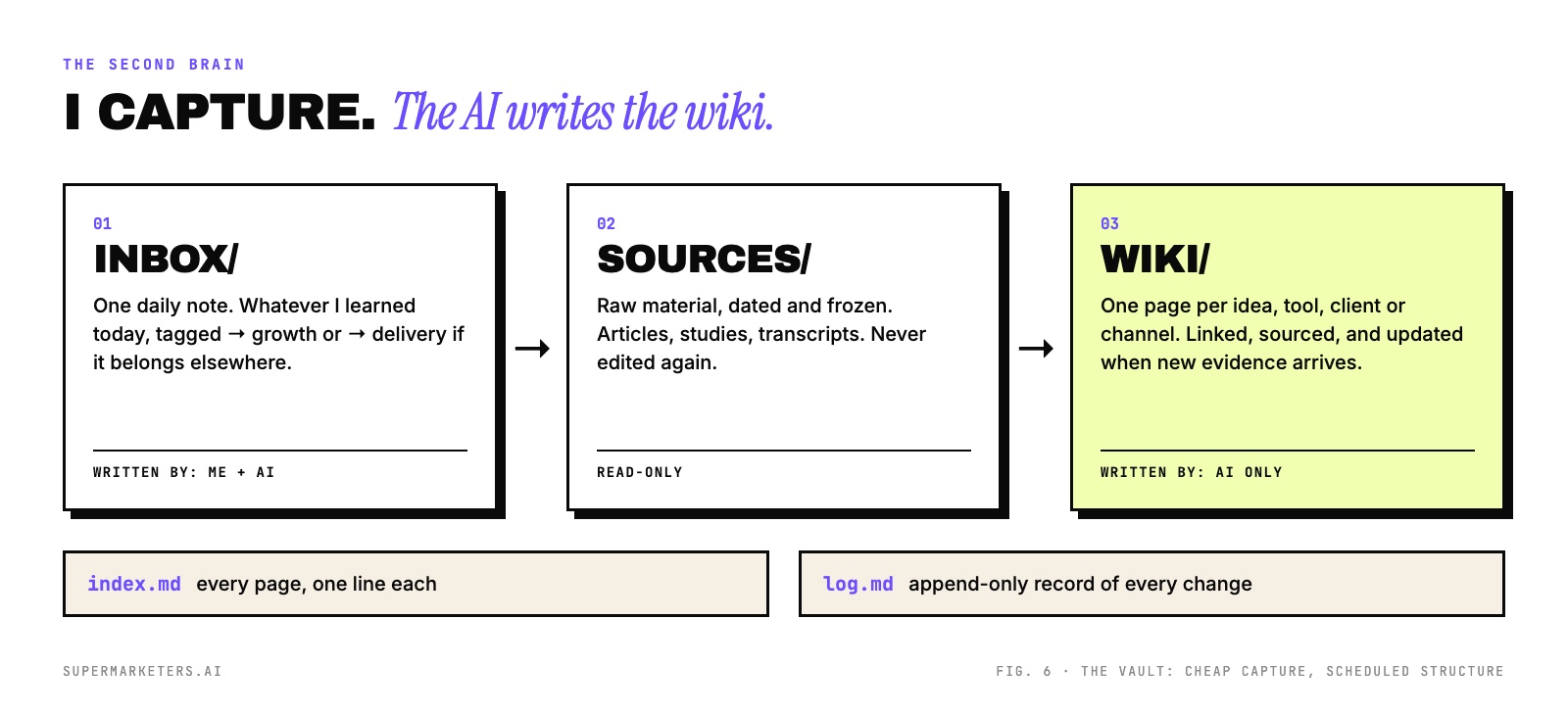
Three folders, three rules:
- inbox/ gets one note a day: what I covered and what I learned. If a lesson belongs in another home, I tag it "→ growth" or "→ delivery" and keep going.
- sources/ holds raw material with the date in the filename. Once something is in there, nobody edits it, including the AI.
- wiki/ is written by the AI only. One page per idea, tool, client or channel, with links between them. When a new source contradicts a page, the AI doesn't overwrite it. It flags the conflict and cites both sources.
The lesson I wrote in my own daily note when I set this up: capture and structure are separate jobs. My first version tried to file every lesson into the right wiki page as I captured it. That made capture slow enough that I skipped it. Now capture is one quick note, and turning notes into wiki pages is a separate step I run later.
I'll be honest about where it stands. The wiki is young. Most of the value so far is in the daily notes and the habit, not in a big polished knowledge base. The structure is there so it can grow without turning back into a swipe file.
How I promote an idea from note to playbook
The three homes aren't just storage. Ideas move through them in one direction.
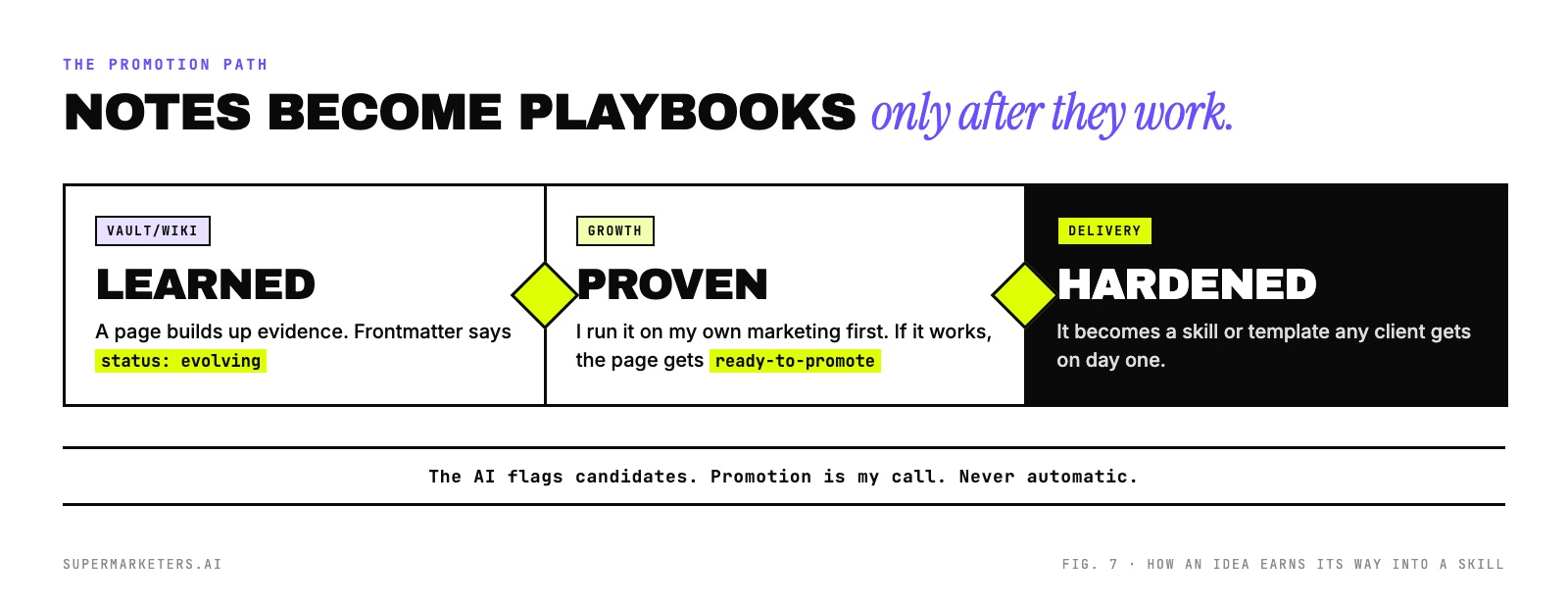
Something I learn about AI search starts as a wiki page. I try it on my own marketing first. If it works, the page gets marked ready-to-promote, and it becomes a skill or template in delivery that every client gets. The AI is allowed to flag candidates. It's never allowed to promote anything on its own. That's the rule that keeps untested ideas out of client work.
How I give every client the same folder
Inside delivery there's a client-scaffold template. Every new client folder is a copy of it: an instruction file, a config folder with their voice guide, ICP, content pillars and seed keywords, then folders for research, intelligence, production and lessons.
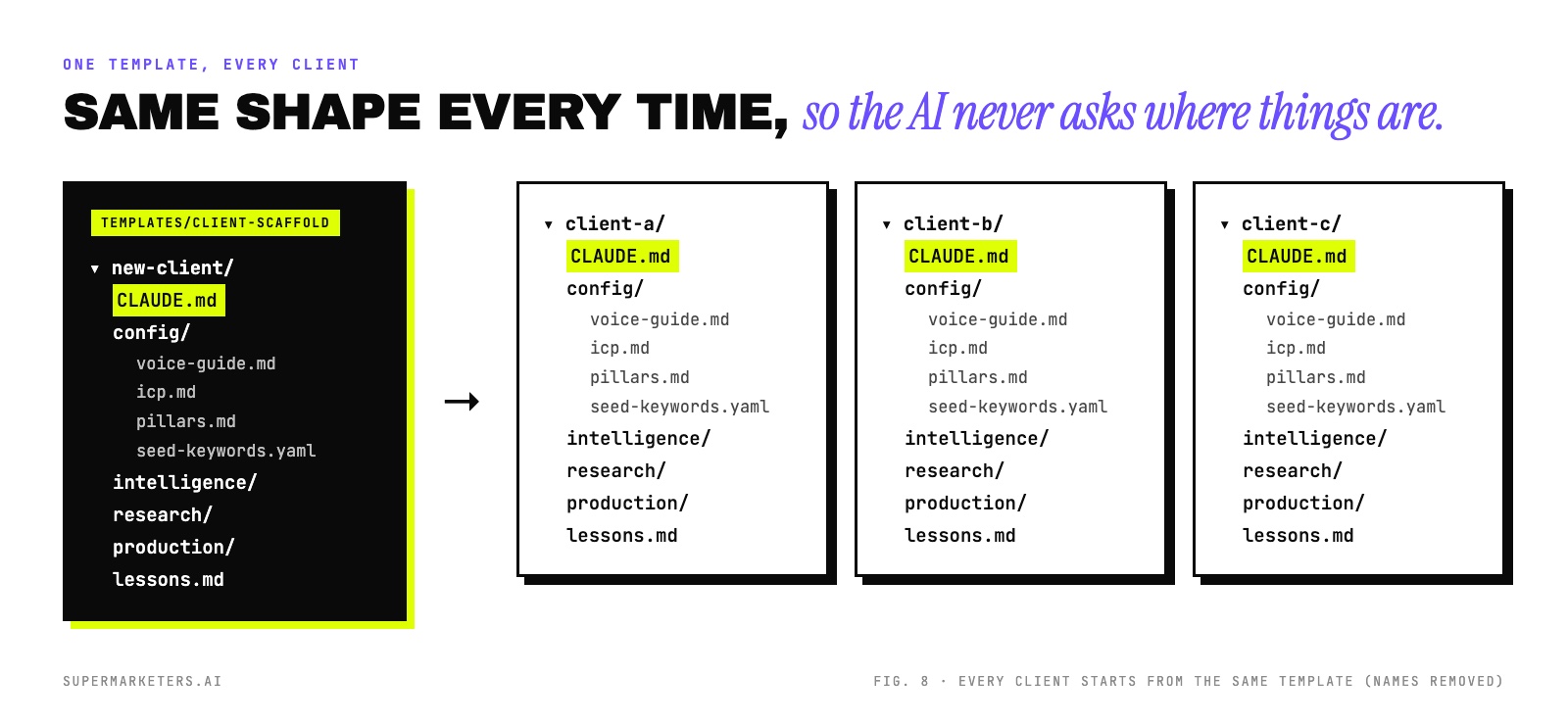
Because the shape never changes, a skill written once works on every client. It knows the voice guide is at config/voice-guide.md without being told. It also keeps clients apart: a skill running on one client's folder never sees another client's research.
How I'd set this up in ChatGPT, Claude or anything else
I run all of this in Claude Code, because it works directly on files on my machine. But the structure doesn't depend on that. The split between knowledge, decisions and methods works in any tool. Only the names change.
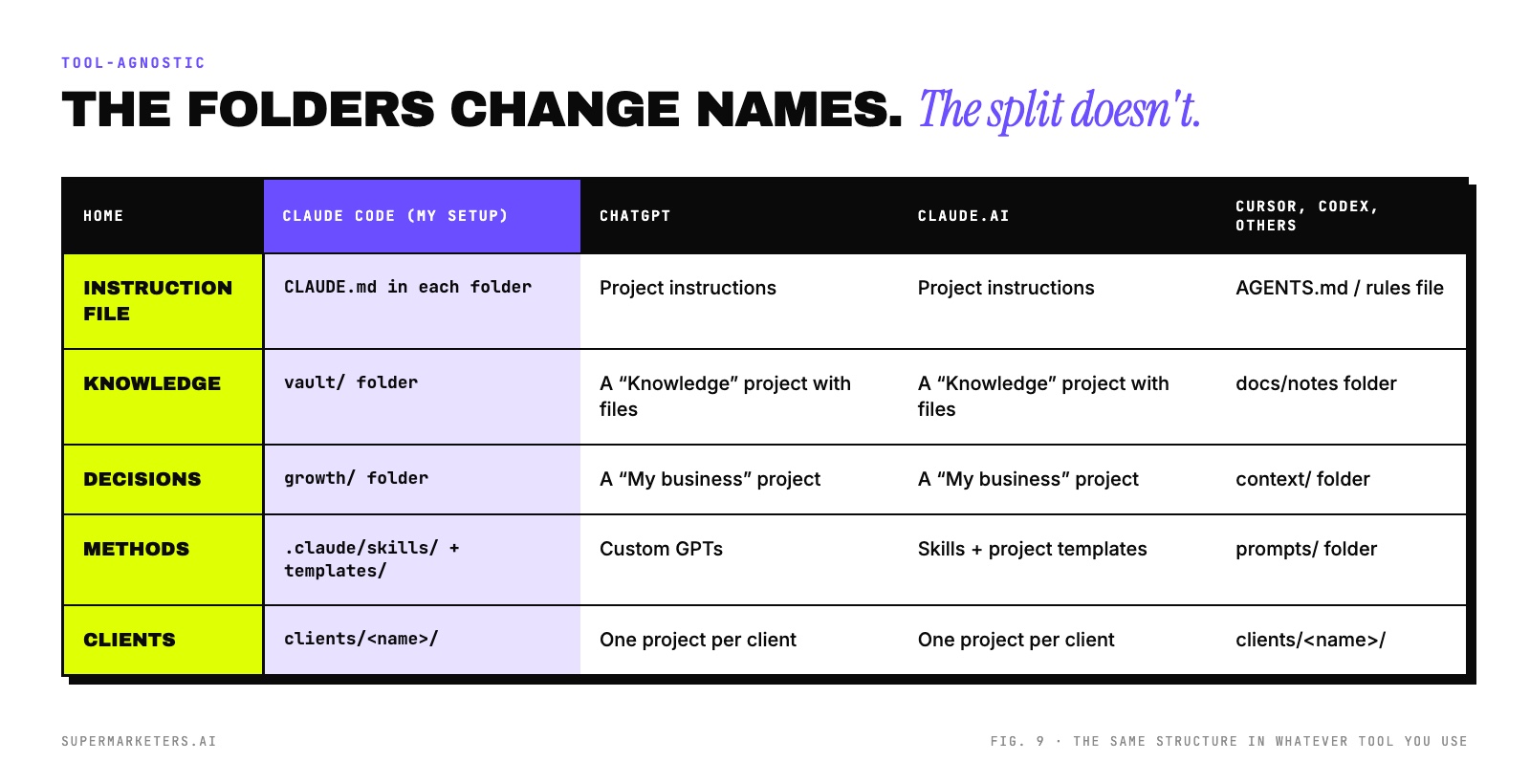
If you live in ChatGPT or Claude.ai, here's how I'd start:
- Make a "My business" project first. Upload your decided docs: offer, ICP, voice guide, banned words. Put the routing rules and style rules in the project instructions. This is your growth home, and it does the most work.
- Make a "Knowledge" project. Drop articles, studies and call notes in as files. Ask it to keep a running summary document, and tell it in the instructions that nothing in here is decided.
- Turn repeat work into methods. Any prompt you've used three times becomes a Custom GPT (ChatGPT) or a Skill (Claude). Keep it generic, with no client names inside.
- One project per client. Same files, same names, every time. Copy the instructions from a template project.
The part you lose outside a file-based tool is routing. ChatGPT can't move a file from one project to another for you. You'll do that sorting yourself, but you'll be using the same question.
What I got wrong along the way
- I named folders after what I did, not what they held. "Ops" and "sprint-engine" meant something to me and nothing to the AI. Both got renamed, and renames are expensive: every path that pointed at the old name broke. Name it right the first time.
- I kept an old copy around. After the rename, a stale clone of the old folder sat on my machine for weeks. Older notes still called it the "canonical home". Delete old copies, or the AI will find them.
- My skills were invisible for a while. Claude Code only loads project skills from the folder you open a session in. I worked from the parent folder, so a whole set of skills in a subfolder never loaded. Skills that span several homes now live in my global skills folder.
- I let output leak into methods. Client drafts kept showing up in the methods folder until I made it a rule that delivery holds nothing client-specific. Now it's the first thing the instruction file says.
One thing I'd keep exactly as it is: when an automated sync between folders ran into files it wasn't sure about, it quarantined them instead of overwriting them. I lost nothing. Build that same caution into any rule that moves your files.
How to copy my setup
Start with three folders and three instruction files. You can add everything else later.
marketing/
├── growth/            # decisions: true about my business today
│   ├── CLAUDE.md      # or project instructions
│   ├── business/      # offer, pricing, plan
│   ├── config/        # voice guide, ICP, pillars, banned words
│   └── production/    # what I'm making
├── vault/             # knowledge: could change
│   ├── CLAUDE.md
│   ├── inbox/         # daily notes
│   ├── sources/       # raw, dated, never edited
│   └── wiki/          # AI-written pages
└── delivery/          # methods: works for anyone
    ├── CLAUDE.md
    ├── skills/        # or prompts/
    ├── templates/
    └── clients/
        └── client-a/  # copied from templates/
And a starter instruction file you can paste into the top folder and adapt:
# What this is
My marketing workspace. Three homes, routed by type,
not by where the conversation happened.

# Routing: apply in order
1. Works for any brand or client      -> delivery/
2. Decided truth about my business    -> growth/
3. Evolving knowledge or evidence     -> vault/sources/
4. Not sure                           -> vault/inbox/, then ask me
A single drop can split. Report where each piece went and why.

# Rules
- Read growth/config/voice-guide.md before writing anything.
- Never treat vault/ content as a decision.
- Never put client names in delivery/.
- No number without a source.
On a 30-minute call we map your team's marketing work into the three homes and pick the first workflows to build. The same setup runs my client work: Intryc doubled its AI visibility in 28 days.
Book a 30-minute call →Then three prompts to get going:
- Sort what you have
Here's a list of my current docs. Sort each one into growth, vault or delivery using the routing rules, and explain any you're unsure of.
- Write your config
Interview me one question at a time to write growth/config/voice-guide.md and icp.md. Use only what I tell you.
- Capture daily
Write today's note in vault/inbox/: what we covered, what I learned, what I decided. Tag anything that belongs in another home.
Before you file anything, ask could new evidence change this? If yes, it's knowledge. If no, it's a decision. If it would work for anyone, it's a method. Write that rule in a file the AI reads first, and you'll stop explaining your business at the start of every chat.